Introduction
A website may contain dozens or even hundreds of useful pages, but simply publishing content does not guarantee that users or search engines will discover all of it. Pages need to be connected in a logical way so that visitors can easily move from one topic to another and search engines can understand the relationship between different pages.
This is where internal linking becomes important.
Internal linking is one of the simplest but often overlooked aspects of SEO. By connecting relevant pages within the same website, internal links help users discover additional information while also providing search engines with valuable information about the structure and relationships among pages.
For example, an article about SEO Content Writing may naturally link to an earlier article about Keyword Research because understanding keywords is an important part of creating SEO-friendly content. Similarly, an article about Technical SEO can link to a broader guide explaining what SEO is.
A well-planned internal linking strategy therefore does more than help visitors navigate a website. It helps transform a collection of individual articles into a connected and organized information system.
In this guide, we will explore what internal linking is, why it matters, the different types of internal links, and how to develop an effective internal linking strategy.
What Is Internal Linking?
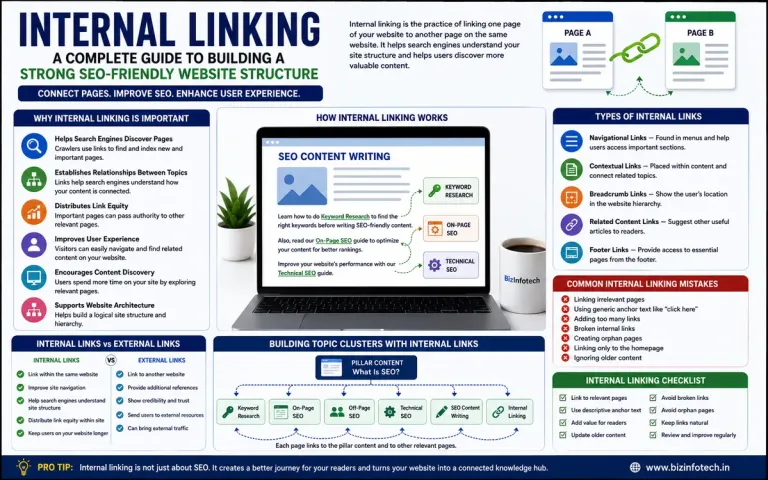
An internal link is a hyperlink that connects one page of a website to another page on the same website.
For example:
Learn more about [Keyword Research] from our complete beginner's guide.
If both pages belong to the same website, the link is an internal link.
Internal links are different from external links, which point from your website to a page on another website.
Simple Example
Internal link:
bizinfotech.in/seo-content-writing → bizinfotech.in/keyword-research
External link:
bizinfotech.in/seo-content-writing → anotherwebsite.com/keyword-research
Internal links allow users to move through related content without leaving the website.
Why Is Internal Linking Important for SEO?
Internal linking serves several important purposes.
1. Helps Search Engines Discover Pages
Search engine crawlers use links to discover and navigate webpages. When an important page is connected through relevant internal links, search engines can discover it more easily.
This is particularly useful for websites that regularly publish new content.
2. Helps Search Engines Understand Relationships
Internal links provide contextual information about how different pages relate to one another.
For example, if several articles about SEO link to a central SEO Guide, this creates a clearer relationship between those pages and the broader topic.
3. Helps Distribute Internal Authority
Internal links can help distribute ranking signals throughout a website. Pages that receive relevant internal links from stronger or well-established pages may receive greater prominence within the site's structure.
This does not mean that every page should receive dozens of links. Relevance and usefulness are more important than quantity.
4. Improves User Navigation
Internal links help visitors find additional information without having to return to the homepage or perform another search.
For example, a reader learning about On-Page SEO may want to understand Technical SEO next. A contextual internal link provides that next step naturally.
5. Encourages Content Discovery
A visitor who arrives through one article can discover several related articles through internal links. This can increase engagement and help users explore more of your website.
Internal Links vs External Links
| Internal Links | External Links |
|---|---|
| Connect pages within the same website | Connect to another website |
| Improve website navigation | Provide references or additional resources |
| Help search engines understand site structure | Connect your content with external sources |
| Support content discovery | Can provide credibility and additional context |
| Help organize related content | Can send users to authoritative external resources |
Both types of links have their own purpose and should be used naturally.
Types of Internal Links
Internal links can appear in different areas of a website.
Navigational Links
These are links found in the main navigation menu and help users access important sections of the website.
Contextual Links
These appear naturally within the body of an article and connect the current topic with related information.
These are particularly valuable for content-based websites.
Breadcrumb Links
Breadcrumbs show the user's position within the website hierarchy.
For example:
Home → SEO → On-Page SEO
They help users understand where they are and provide additional navigational links.
Related Content Links
A "Related Articles" section can connect visitors to other relevant content after they finish reading an article.
Footer Links
Footer links can provide access to important pages, although they should not be overloaded with unnecessary links.
What Is Anchor Text?
Anchor text is the visible, clickable text used for a hyperlink.
For example:
Read our complete guide to keyword research.
Here, "complete guide to keyword research" is the anchor text.
Descriptive anchor text gives readers and search engines useful context about the destination page.
Better Example
Learn how to perform keyword research for SEO.
Less Informative Example
To learn more, click here.
Whenever possible, anchor text should describe the destination page naturally rather than using generic phrases.
How to Create an Effective Internal Linking Strategy
Internal linking should not be treated as randomly adding links to old articles. A useful strategy connects pages according to their topic, relevance, and position within the website's content structure.
1. Link Relevant Pages Naturally
The most important principle is relevance.
If you are writing about SEO Content Writing, linking to an article about Keyword Research makes sense because the two topics are closely related.
However, adding a link to an unrelated topic simply because you need another internal link provides little value.
2. Connect Supporting Articles to Important Pages
A website can have broad pillar content supported by more specific articles.
For example:
↓
Keyword Research
On-Page SEO
Off-Page SEO
Technical SEO
SEO Content Writing
Internal Linking
These pages can be connected to one another where relevant.
This structure helps create a topic cluster, in which multiple related articles collectively demonstrate comprehensive coverage of a subject.
3. Use Descriptive Anchor Text
Anchor text should naturally indicate what users will find after clicking the link.
Instead of:
Read more here.
Use:
Learn more about technical SEO and website optimization.
The second example provides much more context.
However, anchor text should remain natural. Repeatedly using exactly the same keyword-rich anchor text across every link can make the linking pattern appear unnatural.
4. Link New Articles From Older Content
When you publish a new article, do not only add links from the new article to older pages.
Go back to relevant older articles and add links to the new article where appropriate.
For example, after publishing your Internal Linking article, you could update your previous SEO articles and add a relevant link to it.
This helps existing pages introduce readers and search engines to your new content.
5. Avoid Excessive Internal Links
There is no universal ideal number of internal links for every page.
Adding links simply to increase the number of links can make an article difficult to read. Instead, use links when they genuinely help the reader understand the subject or continue their learning journey.
Quality and relevance should guide internal linking rather than a fixed number.
Building Topic Clusters With Internal Links
Internal linking becomes particularly powerful when combined with a topic-cluster strategy.
For example, your BizInfotech SEO series can be organized around a central SEO topic:
Main Topic
What Is SEO?
Supporting Topics
- How Search Engines Work
- Keyword Research
- On-Page SEO
- Off-Page SEO
- Technical SEO
- SEO Content Writing
- Internal Linking
The main SEO guide can link to these supporting articles, while the supporting articles can link back to the main guide and to other closely related articles.
This creates a connected knowledge structure rather than a collection of isolated blog posts.
Common Internal Linking Mistakes
Avoid these common problems:
Linking Irrelevant Pages
Links should have a meaningful connection with the surrounding content.
Using Generic Anchor Text
Excessive use of phrases such as "click here" provides little context.
Linking Only to the Homepage
Important pages deeper within your website should also receive relevant internal links.
Ignoring Older Articles
Older content can be valuable sources of internal links to newer articles.
Creating Broken Internal Links
Broken links create a poor user experience and should be identified and corrected.
Creating Orphan Pages
An orphan page is a page that has no meaningful internal links pointing to it. Such pages can be harder for users and search engines to discover.
Internal Linking Checklist
Before publishing an article, ask:
- ✔ Does the article link to relevant existing content?
- ✔ Is the anchor text descriptive?
- ✔ Are the links genuinely useful to readers?
- ✔ Have important pages received relevant internal links?
- ✔ Have older articles been updated when appropriate?
- ✔ Are any internal links broken?
- ✔ Does the website have orphan pages?
- ✔ Does the overall linking structure reflect the site's topic hierarchy?
Practical Example: Internal Linking for BizInfotech
Your SEO series provides an excellent opportunity to implement a structured internal linking strategy.
For example, the SEO Content Writing article can link to:
- Keyword Research when discussing keyword selection.
- On-Page SEO when discussing page optimization.
- Technical SEO when discussing website performance.
- Off-Page SEO when discussing broader SEO strategy.
Similarly, your Technical SEO article can link back to the main What Is SEO? guide.
This creates multiple paths through which readers can explore your SEO resources.
Conclusion
Internal linking is a fundamental part of building a well-structured website. It helps users navigate related information, allows search engines to discover pages, establishes relationships between topics, and can help distribute internal authority throughout a website.
An effective strategy does not depend on adding as many links as possible. Instead, it focuses on relevance, context, descriptive anchor text, and a logical relationship between pages.
For a content-focused website such as BizInfotech, internal linking can be particularly valuable. By connecting your SEO articles into a coherent topic cluster, you can transform individual articles into a comprehensive learning resource.
Ultimately, the best internal linking strategy is one that makes the website easier for both people and search engines to understand.
Further Readings:-
The Complete Guide to Digital Marketing: Channels, Benifits, Strategies and Future Trends (2026)
What Is SEO? A Complete Guide to Search Engine Optimization for Beginners
How Do Search Engines Work? Crawling, Indexing, and Ranking Explained
Keyword Research: A Complete Beginner's Guide to Finding the Right Keywords for SEO
On-Page SEO: A Complete Guide to Optimizing Your Web Pages
Off-Page SEO: A Complete Guide to Building Website Authority and Trust
Technical SEO: A Complete Guide to Improving Your Website's Technical Foundation
SEO Content Writing: How to Create Content That Ranks and Engages Readers
Frequently Asked Questions
1. What is internal linking in SEO?
Internal linking is the practice of linking one page of a website to another page on the same website.
2. Why are internal links important?
They help users navigate the website, assist search engines in discovering pages, and establish relationships between related content.
3. How many internal links should an article have?
There is no fixed number. Add links where they provide genuine value and are relevant to the surrounding content.
4. What is anchor text?
Anchor text is the clickable text used for a hyperlink. Descriptive anchor text helps users understand what they will find on the linked page.
5. What is an orphan page?
An orphan page is a webpage that has no meaningful internal links pointing to it from other pages on the website.
6. Do internal links improve SEO?
A well-planned internal linking structure can support SEO by improving crawling, content discovery, navigation, and the relationships between pages.