Introduction
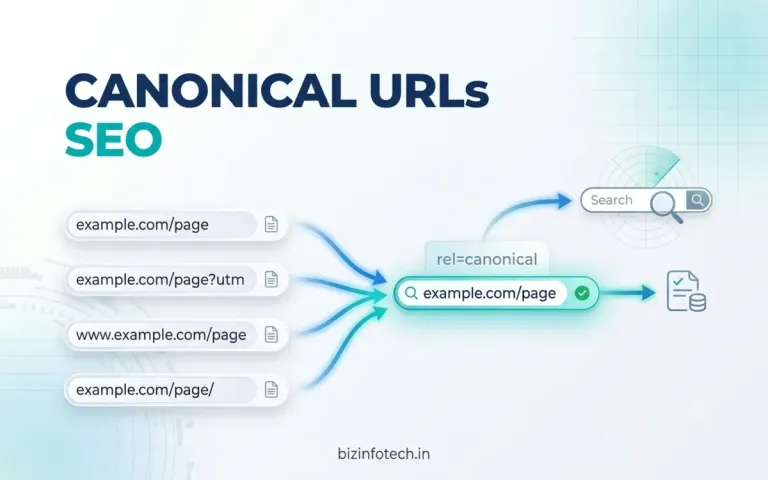
A website can sometimes display the same or very similar content through multiple URLs. This can happen because of URL parameters, HTTP and HTTPS versions, trailing slashes, duplicate pages, sorting and filtering, or changes in website structure.
For example, the same article might be accessible through:
https://example.com/article https://example.com/article/ https://example.com/article?utm_source=facebook https://example.com/article?utm_source=newsletter
Although these URLs may represent essentially the same content, search engines need to determine which URL should be treated as the primary version.
This is where canonical URLs become important.
A canonical URL is the preferred or representative URL for a piece of content when multiple URLs contain duplicate or substantially similar content. Google uses canonicalization to select the representative URL from a group of duplicate pages.
In this guide, we will explain what canonical URLs are, why they matter for SEO, how to implement them correctly, common mistakes, and how to troubleshoot canonicalization problems.
What Is a Canonical URL?
A canonical URL is the preferred URL that represents a particular page or piece of content when multiple URLs contain the same or very similar content.
For example, suppose your website has:
https://example.com/seo-guide
and the same page can also be accessed through:
https://example.com/seo-guide?utm_source=facebook
You may want the clean URL to be the preferred version:
https://example.com/seo-guide
You can communicate this preference using a canonical link element:
<link rel="canonical" href="https://example.com/seo-guide">
Google describes rel="canonical" as a strong signal for indicating which URL should be considered the representative version of duplicate or very similar pages. However, it is important to understand that a canonical declaration is a signal or hint, not an absolute command. Google can select a different canonical when other signals indicate that another URL is more appropriate.
What Is Canonicalization in SEO?
Canonicalization is the process of selecting one representative URL from a group of duplicate or substantially similar URLs.
Imagine that a website has five URLs containing essentially the same page:
URL A URL B URL C URL D URL E
Instead of treating every URL as a completely separate page, search engines can group them together and select one representative URL.
That selected URL is the canonical URL.
Google explains that duplicate URLs can occur for many reasons, including:
HTTP and HTTPS versions
URL parameters
sorting and filtering
regional variations
mobile or alternate versions
accidental duplicate URLs
different URL structures showing the same content
Why Are Canonical URLs Important for SEO?
Canonicalization helps search engines understand which URL you consider the primary version of a page.
It can help with several aspects of SEO.
1. Consolidating Duplicate URLs
If multiple URLs represent essentially the same content, canonicalization provides a signal about which URL should represent that content.
For example:
https://example.com/product https://example.com/product?color=red https://example.com/product?utm_source=email
If these URLs are essentially the same page, you may want:
https://example.com/product
to be the preferred URL.
2. Consolidating Signals
Multiple URLs can accumulate signals such as links and other references.
Google explains that canonicalization can help consolidate signals associated with duplicate URLs toward a preferred URL when that URL is selected as canonical.
This can make it easier for search engines to understand which URL represents the primary version of your content.
3. Improving URL Consistency
Canonical URLs also encourage consistency.
Suppose internal links use:
https://example.com/article
while the sitemap uses:
https://www.example.com/article
and the canonical tag uses:
https://example.com/article/
These conflicting signals can make canonicalization less clear.
A better approach is to consistently use one preferred URL format.
4. Helping Search Engines Manage Duplicate Content
Duplicate content is not automatically a penalty.
Google states that having some duplicate content is normal and is not, by itself, a violation of its spam policies. However, multiple URLs containing the same content can make it more difficult to determine which URL should be shown and can create unnecessary crawling and reporting complexity.
Canonicalization helps communicate your preferred version.
Does Duplicate Content Cause an SEO Penalty?
This is one of the most common misconceptions about canonical URLs.
Duplicate content does not automatically result in a Google penalty.
Websites naturally create duplicate or near-duplicate URLs for many legitimate reasons.
For example:
/product /product?color=blue /product?utm_source=email
may all lead to the same underlying product.
Google's documentation explains that duplicate content is not inherently a violation of its spam policies.
The important issue is making your preferred URL clear and avoiding unnecessary duplication where possible.
What Is the Canonical Tag?
The canonical tag is an HTML <link> element placed inside the <head> section of a webpage.
A typical canonical tag looks like this:
<link rel="canonical" href="https://example.com/seo-guide">
The important parts are:
link — HTML link element
rel="canonical" — identifies the link as the canonical URL
href — specifies the preferred URL
Google recommends using an absolute URL rather than a relative URL for canonical annotations.
Recommended
<link rel="canonical" href="https://example.com/seo-guide">
Less desirable
<link rel="canonical" href="/seo-guide">
Although relative URLs may work, Google recommends absolute URLs because they reduce the possibility of configuration errors.
Where Should the Canonical Tag Be Placed?
The canonical link should be placed inside the <head> section of the HTML document.
Example:
<!DOCTYPE html> <html lang="en"> <head> <title>SEO Guide</title> <meta name="description" content="Complete SEO guide for beginners."> <link rel="canonical" href="https://example.com/seo-guide"> </head> <body> ... </body> </html>
Google's documentation states that the rel="canonical" link element is accepted when it appears in the HTML <head>.
What Is a Self-Referencing Canonical?
A self-referencing canonical is a canonical tag that points to the URL of the page itself.
For example, if the page URL is:
https://example.com/keyword-research
the page can contain:
<link rel="canonical" href="https://example.com/keyword-research">
Google recommends adding a self-referential canonical to the canonical page itself.
This can make your preferred URL explicit even when there are no obvious duplicate URLs.
Example of a Self-Referencing Canonical
Suppose your article URL is:
https://bizinfotech.in/post/keyword-research-guide
Your <head> section could contain:
<link rel="canonical" href="https://bizinfotech.in/post/keyword-research-guide">
If the article is also accessible through tracking parameters such as:
https://bizinfotech.in/post/keyword-research-guide?utm_source=facebook
the canonical can still point to:
https://bizinfotech.in/post/keyword-research-guide
Canonical URLs and URL Parameters
URL parameters are one of the most common causes of duplicate URLs.
For example:
https://example.com/article
and:
https://example.com/article?utm_source=facebook
may display the same article.
Other examples include:
?utm_source=newsletter ?utm_campaign=summer ?ref=social
These parameters can create multiple URL variations of the same page.
A canonical URL can communicate that the clean URL is the preferred version.
Canonical URLs and Tracking Parameters
Tracking parameters are particularly common when sharing content through social media, email, and advertising campaigns.
For example:
https://example.com/article?utm_source=linkedin
may be used to measure LinkedIn traffic.
You generally don't want every tracking variation to become a separate representative URL.
Instead, the underlying article can use:
<link rel="canonical" href="https://example.com/article">
This separates traffic tracking from the preferred URL representation.
Canonical URLs and HTTP vs HTTPS
Another common duplication problem occurs when both HTTP and HTTPS versions are accessible.
For example:
http://example.com/page
and:
https://example.com/page
Ideally, a website should use HTTPS as the preferred version.
Google states that its systems generally prefer HTTPS over equivalent HTTP URLs, although other technical signals and configuration problems can affect canonical selection.
A strong website configuration should therefore generally include:
HTTP → HTTPS
through a permanent redirect.
The canonical should also use the HTTPS URL.
Canonical URLs and WWW vs Non-WWW
A similar issue can occur between:
https://www.example.com/page
and:
https://example.com/page
Both versions may potentially be accessible.
You should choose one preferred domain format and consistently use it.
For example:
https://example.com/page
Then use:
HTTPS
preferred host
preferred URL structure
canonical tags
internal links
sitemap URLs
consistently.
Google considers redirects and canonical annotations among the signals used for canonicalization.
Canonical URLs and Trailing Slashes
Consider:
https://example.com/seo-guide
and:
https://example.com/seo-guide/
Depending on the server configuration, these can potentially resolve to different URLs.
Choose one format and maintain consistency.
For example:
https://example.com/seo-guide
Then use that version in:
canonical tags
internal links
sitemap
redirects
social sharing URLs
Canonical URLs and URL Case
URLs can also create problems when different capitalization is accepted by the server.
For example:
https://example.com/SEO-guide
and:
https://example.com/seo-guide
could potentially resolve differently depending on the server.
A good URL structure should use a consistent lowercase format.
For example:
https://example.com/seo-guide
Canonical URLs and Duplicate Content
Canonicalization is particularly useful when multiple pages contain substantially similar content.
Examples include:
product variations
printer-friendly pages
filtered category pages
tracking URLs
duplicate article URLs
HTTP/HTTPS variants
www/non-www variants
URL parameter variations
However, canonicalization should not be used simply because two pages share a few words.
The pages should have sufficiently similar primary content for canonicalization to make sense.
Canonical vs Redirect
Canonical tags and redirects are related but serve different purposes.
Canonical
A canonical tag says:
"This page exists, but this other URL is the preferred representative."
For example:
<link rel="canonical" href="https://example.com/main-page">
The duplicate URL remains accessible.
Redirect
A redirect says:
"This URL has moved; send the user to another URL."
For example:
old-page → new-page
When permanently replacing an old URL, a server-side permanent redirect is generally the appropriate approach.
Google describes redirects as a strong canonicalization signal and recommends them when you want to get rid of an existing duplicate URL.
When Should You Use a 301 Redirect Instead of Canonical?
Use a permanent redirect when the old URL should no longer be independently accessible.
For example:
https://example.com/old-seo-guide
has been permanently replaced by:
https://example.com/complete-seo-guide
You could redirect:
/old-seo-guide
to:
/complete-seo-guide
This is preferable to keeping both pages active and simply adding a canonical.
Canonical vs Noindex
Canonical and noindex are also different.
Canonical
Indicates the preferred representative URL among duplicate or similar pages.
Noindex
Tells search engines not to include the page in their index.
For example:
<meta name="robots" content="noindex">
These should not be treated as interchangeable.
Google specifically recommends using rel="canonical" rather than noindex when the goal is to consolidate duplicate pages into a preferred canonical URL.
Canonical vs Robots.txt
This distinction is especially important following your previous Robots.txt article.
Robots.txt
Controls whether crawlers can request certain URL paths.
Canonical
Indicates which URL is preferred among duplicate or similar URLs.
Do not use robots.txt as your canonicalization mechanism.
Google explicitly recommends against using robots.txt for canonicalization because a blocked URL may still be indexed without its content being crawled.
For example, this is not a good canonicalization strategy:
User-agent: * Disallow: /duplicate-page/
if your intention is simply to tell Google that another URL is the preferred version.
Canonical URLs and XML Sitemaps
Your XML sitemap also sends a canonicalization signal.
Google recommends including the preferred canonical URLs in your sitemap. Sitemap inclusion is a weaker canonicalization signal than a rel="canonical" annotation or redirect, but it reinforces your preferred URL structure.
For example, if:
https://example.com/seo-guide
is your canonical URL, your sitemap should contain:
<loc>https://example.com/seo-guide</loc>
rather than a duplicate parameter version.
Canonical URLs and Internal Links
Your internal links should normally point to the canonical version of a page.
For example, if your preferred URL is:
https://example.com/seo-guide
your internal links should use:
<a href="https://example.com/seo-guide">
rather than:
https://example.com/seo-guide?source=internal
Google specifically recommends linking internally to the canonical URL rather than duplicate versions.
Canonical URLs and Social Media
When sharing an article on:
X
use the preferred public URL whenever possible.
For example:
https://bizinfotech.in/post/canonical-urls
rather than a URL containing unnecessary parameters.
Tracking parameters can still be used when needed, but your canonical should remain the clean preferred URL.
Canonical URLs for a Custom PHP Website
Canonical URLs are particularly straightforward to implement in a custom PHP website.
Suppose your article system uses:
/post/{slug}
and your database contains:
slug = canonical-urls
The public URL could be:
https://bizinfotech.in/post/canonical-urls
Your article page can generate:
<link rel="canonical" href="https://bizinfotech.in/post/canonical-urls">
The important point is that the canonical URL should be generated from the actual preferred URL structure, rather than allowing arbitrary request parameters to determine it.
Example for a PHP Article Page
Suppose your PHP page obtains the article slug:
$slug = $post['slug'];
You can construct the canonical URL:
$canonical_url = 'https://bizinfotech.in/post/' . $slug;
Then output:
<link rel="canonical" href="<?= htmlspecialchars($canonical_url, ENT_QUOTES, 'UTF-8') ?>">
This can create a self-referencing canonical for each article.
For example:
Database slug: canonical-urls
produces:
https://bizinfotech.in/post/canonical-urls
and:
<link rel="canonical" href="https://bizinfotech.in/post/canonical-urls">
The exact implementation should match your existing URL and routing structure.
Canonical URLs and Your Database
If your website stores article slugs in a database, it is important to maintain one stable canonical slug for each article.
For example:
| Article | Canonical URL |
|---|---|
| What Is SEO? | /post/what-is-seo |
| Keyword Research | /post/keyword-research |
| Search Intent | /post/search-intent-seo |
| Canonical URLs | /post/canonical-urls |
If an article slug changes, the old URL should generally redirect to the new URL rather than creating two independently accessible versions.
Canonical URLs After Changing a Slug
Suppose your original article URL is:
https://bizinfotech.in/post/old-seo-title
and you change the slug to:
https://bizinfotech.in/post/new-seo-title
A good migration would generally involve:
Old URL ↓ 301 Redirect ↓ New URL
The new page should have:
<link rel="canonical" href="https://bizinfotech.in/post/new-seo-title">
Your sitemap and internal links should also use the new URL.
This creates consistent signals around the new preferred URL.
Should Every Page Have a Canonical Tag?
For many websites, using a self-referencing canonical on important indexable pages is a practical approach.
For example:
<link rel="canonical" href="https://example.com/page">
However, canonical tags should not be generated blindly.
The URL must actually represent the preferred version of that content.
Google notes that canonicalization is not always required because Google can select a canonical itself, but explicitly specifying a preferred canonical can be useful when duplicate or similar URLs exist.
What Is a Cross-Domain Canonical?
A canonical URL does not necessarily have to belong to the same domain.
For example:
<link rel="canonical" href="https://example.com/original-article">
could appear on a duplicate version hosted elsewhere.
However, cross-domain canonicalization should be used carefully.
The two pages should genuinely represent the same or substantially similar content.
Incorrect cross-domain canonical tags can send confusing signals.
Google's canonicalization troubleshooting documentation also identifies unexpected cross-domain canonical signals as a potential technical issue.
Canonical URLs and Syndicated Content
Suppose another website republishes an article originally published on your website.
A canonical tag can sometimes be used to indicate the original version, but canonicalization is not a universal solution for syndicated content.
Google's documentation specifically notes that canonical links are not recommended as the primary solution for duplication caused by syndication partners because syndicated pages may differ significantly.
Syndication arrangements should therefore be handled according to the specific circumstances and indexing requirements.
Canonical URLs for E-Commerce Websites
E-commerce websites frequently face canonicalization challenges.
For example:
/product/shoes /product/shoes?color=black /product/shoes?size=10 /product/shoes?sort=price
Some parameters may represent meaningful variations while others may simply modify how the same product list is displayed.
The correct canonical strategy depends on whether the URL represents:
genuinely different content
a useful product variation
a temporary filter
sorting
tracking
duplicate content
Don't automatically canonicalize every parameterized URL to the same page.
Canonical URLs and Category Pages
Suppose a blog has:
/category/seo
and:
/category/seo?page=2
These may represent different sets of articles.
You should not automatically canonicalize every pagination URL to page one.
The correct approach depends on how the pagination is implemented and whether each page represents distinct content.
Canonicalization should reflect the actual relationship between the pages.
Canonical URLs and Mobile Websites
Modern responsive websites normally use the same URL for desktop and mobile content.
However, historically some websites used separate mobile URLs such as:
https://example.com/page https://m.example.com/page
Google's canonicalization documentation describes how alternate mobile URLs can be associated with canonical desktop URLs when separate mobile URLs are used.
For modern responsive websites, however, using one URL for both desktop and mobile is usually much simpler.
Canonical URLs and International Websites
International websites may have:
example.com/us/ example.com/uk/ example.com/in/
These pages may be similar but intended for different regions.
In such cases, canonicalization needs to be considered together with hreflang.
Google recommends that localized versions use appropriate canonical and hreflang relationships.
Do not automatically canonicalize every regional version to one global URL if the pages genuinely serve different audiences.
Common Canonical URL Mistakes
1. Pointing the Canonical to a Non-Equivalent Page
For example:
<link rel="canonical" href="https://example.com/home">
on an article about technical SEO.
The canonical should represent substantially the same content.
2. Canonicalizing Every Page to the Homepage
This is a serious implementation error.
For example:
<link rel="canonical" href="https://example.com/">
on every article.
Each unique article should normally have its own preferred URL unless there is a legitimate reason for consolidation.
3. Using a Non-HTTPS Canonical
If your preferred website version is HTTPS, don't accidentally generate:
http://example.com/page
as the canonical.
Use:
https://example.com/page
and maintain consistent HTTPS signals.
4. Mixing WWW and Non-WWW URLs
Avoid situations where:
canonical → example.com
but:
sitemap → www.example.com
and:
internal links → example.com
Choose one preferred host and use it consistently.
5. Canonical Points to a Redirecting URL
Ideally, your canonical should point directly to the final preferred URL rather than a URL that itself redirects.
For example, avoid:
canonical → old-page old-page → 301 → new-page
when you can simply use:
canonical → new-page
6. Canonical Points to a 404 Page
A canonical should not point to a page that doesn't exist.
Bad:
<link rel="canonical" href="https://example.com/deleted-page">
The canonical should return the intended live page.
7. Multiple Canonical Tags
Avoid putting multiple conflicting canonical tags on the same page.
For example:
<link rel="canonical" href="https://example.com/page-a"> <link rel="canonical" href="https://example.com/page-b">
This creates conflicting signals.
Google's documentation warns that multiple or conflicting canonical declarations can lead to unexpected results.
8. Canonical and Sitemap Disagree
Suppose:
Canonical: https://example.com/article
but sitemap contains:
https://www.example.com/article
These signals should not conflict.
Google specifically recommends avoiding different canonical URLs being specified through different canonicalization methods.
9. Blocking the Duplicate with Robots.txt
Do not use:
robots.txt → block duplicate
as a substitute for canonicalization.
Google may still discover or index a blocked URL without crawling its content.
Best Practices for Canonical URLs
Here are the most important practices to follow.
1. Use Absolute URLs
Prefer:
<link rel="canonical" href="https://example.com/page">
rather than:
<link rel="canonical" href="/page">
2. Use HTTPS
If HTTPS is your preferred version, make sure canonical URLs use HTTPS.
3. Use One Preferred Host
Choose either:
example.com
or:
www.example.com
and maintain consistency.
4. Use Self-Referencing Canonicals
For important indexable pages, a self-referencing canonical can clearly communicate the preferred URL.
5. Keep Internal Links Consistent
Link directly to your preferred canonical URLs.
6. Keep Your Sitemap Consistent
Include preferred canonical URLs in your XML sitemap.
7. Use Redirects When URLs Are Permanently Replaced
If an old URL should no longer exist, use a permanent redirect instead of relying only on canonicalization.
8. Don't Use Robots.txt for Canonicalization
Robots.txt and canonical tags have different purposes.
9. Don't Use Noindex as a Replacement for Canonical
If two pages are duplicates and you want one to represent the other, canonicalization is generally more appropriate than using noindex on the duplicate.
10. Keep Your Signals Consistent
Your:
canonical
sitemap
redirects
internal links
preferred domain
HTTPS configuration
should all point toward the same URL version.
How to Check the Canonical URL of a Page
You can check a page's canonical in several ways.
Method 1: View Page Source
Open the page and select:
View Page Source
Then search for:
canonical
You should find something similar to:
<link rel="canonical" href="https://example.com/page">
Method 2: Browser Developer Tools
You can inspect the <head> section using your browser's developer tools.
Look for:
<link rel="canonical">
Method 3: Google Search Console
Google Search Console's URL Inspection tool can help you determine which canonical Google selected for a URL.
Google specifically recommends using URL Inspection when troubleshooting cases where Google's selected canonical differs from your preferred canonical.
User-Declared Canonical vs Google-Selected Canonical
This distinction is extremely important.
Suppose your page contains:
<link rel="canonical" href="https://example.com/page-a">
You have declared page A as canonical.
But Google may ultimately select page B if its systems determine that page B is a better representative based on the available signals.
Therefore:
Declared canonical ≠ guaranteed Google-selected canonical
Google explicitly states that canonical declarations are hints rather than absolute rules.
What If Google Chooses a Different Canonical?
First, don't immediately assume there is an error.
Google can choose a different canonical for legitimate reasons.
Check:
1. Is the content genuinely similar?
If two pages are substantially different, they may need to remain separate.
2. Are the URLs technically consistent?
Check:
HTTPS
www/non-www
trailing slash
redirects
canonical tags
3. Are internal links consistent?
Make sure important links point to your preferred URL.
4. Is the preferred URL in the sitemap?
Check your XML sitemap.
5. Does the preferred URL actually contain the best version of the content?
Canonical selection is influenced by content and other signals, not just the canonical tag.
Google recommends checking technical configuration and content similarity when troubleshooting canonicalization issues.
A Practical Canonical SEO Checklist
Before publishing or updating a page, check:
URL
Is the URL clean?
Is it HTTPS?
Is the preferred domain correct?
Is the URL lowercase?
Is the slug stable?
Canonical
Does the page have a canonical tag?
Is it an absolute URL?
Does it point to the correct page?
Is there only one canonical tag?
Internal Linking
Do internal links point to the preferred URL?
Are old URLs still being linked?
Sitemap
Is the preferred URL included?
Are duplicate URLs excluded?
Redirects
Do old URLs redirect to the correct new URL?
Does the canonical point directly to the final URL?
Robots.txt
Is the canonical page crawlable?
Are you accidentally blocking important pages?
Search Console
What canonical does Google select?
Does it match your intended canonical?
Canonical URLs for BizInfoTech
For a content website such as BizInfoTech, canonical management becomes increasingly important as the number of articles grows.
Suppose an article is:
https://bizinfotech.in/post/canonical-urls-seo
The page should ideally contain:
<link rel="canonical" href="https://bizinfotech.in/post/canonical-urls-seo">
Your internal links should use:
https://bizinfotech.in/post/canonical-urls-seo
Your XML sitemap should contain:
https://bizinfotech.in/post/canonical-urls-seo
And if the slug changes, the old URL should ideally redirect to the new URL.
This creates a consistent set of signals around the preferred URL.
Canonical URLs and Your SEO Content Strategy
As your SEO article library grows, canonicalization becomes part of your overall technical SEO structure.
For example, you may have articles about:
What Is SEO?
Keyword Research
Search Intent
SEO Title Tags
Meta Descriptions
Keyword Mapping
Keyword Cannibalization
XML Sitemaps
Robots.txt
Canonical URLs
Each article should have its own clear URL and canonical unless there is a legitimate reason to consolidate it with another page.
This helps maintain a clean relationship between your:
Content → URL → Canonical → Internal Links → Sitemap
Frequently Asked Questions
What is a canonical URL in SEO?
A canonical URL is the preferred representative URL for a piece of content when multiple URLs contain duplicate or substantially similar content.
Does every website need canonical URLs?
Not every page technically requires a canonical declaration, because Google can select a canonical itself. However, explicitly declaring preferred URLs can help clarify your site's URL structure and duplicate-page relationships.
Is canonical a ranking factor?
Canonicalization helps search engines determine which URL represents a group of duplicate or similar pages. It should not be viewed as a simple ranking-factor trick.
Can canonical URLs prevent duplicate content penalties?
Duplicate content itself is not automatically a penalty. Canonicalization helps search engines understand which version should represent duplicate or similar content.
Should I use canonical or 301 redirect?
Use a permanent redirect when an old URL should be replaced by another URL. Use canonicalization when multiple accessible URLs need to remain available but one is the preferred representative. Google considers redirects a strong canonicalization signal.
Can I use robots.txt instead of canonical?
No. Robots.txt controls crawling and should not be used as your canonicalization method.
Can canonical and noindex be used together?
They serve different purposes and should not be treated as interchangeable. If your goal is to consolidate duplicate URLs into a preferred page, Google recommends rel="canonical" rather than using noindex for that purpose.
Can Google ignore my canonical tag?
Yes. A canonical declaration is a signal, not an absolute instruction. Google can select another URL if other signals indicate that another page is a better representative.
Should the canonical URL be included in the XML sitemap?
Yes. Including preferred canonical URLs in your sitemap reinforces your URL preference, although sitemap inclusion is a weaker signal than a rel="canonical" annotation or redirect.
Should I use a self-referencing canonical?
A self-referencing canonical is a recommended practice for the canonical page itself and can make your preferred URL explicit.
Final Thoughts
Canonical URLs are an important part of technical SEO because modern websites can easily generate multiple URLs for the same or similar content.
The key is to make your preferred URL clear and consistent.
A strong canonicalization strategy generally follows this pattern:
Choose the preferred URL → use a canonical tag → link internally to that URL → include it in your sitemap → redirect obsolete URLs → keep HTTPS and domain versions consistent.
Most importantly, remember that a canonical tag is a signal, not a guarantee. Google evaluates canonicalization using multiple signals, including redirects, canonical annotations, sitemap inclusion, HTTPS, and the similarity and quality of pages.
For a growing website such as BizInfoTech, establishing this structure early can make future URL changes, content expansion, and technical SEO management much easier.
Key Takeaway
A canonical URL tells search engines which URL you consider the preferred representative of duplicate or substantially similar content. Use it consistently with your redirects, internal links, sitemap, and overall URL structure.
Related articles:-
On-Page SEO: A Complete Guide to Optimizing Your Web Pages
Technical SEO: A Complete Guide to Improving Your Website's Technical Foundation
What Is SEO? A Complete Guide to Search Engine Optimization
Robots.txt: Complete Guide to Controlling Search Engine Crawling
XML Sitemap: Complete Guide to Creating and Optimizing Your Sitemap