ntroduction
Creating high-quality content and optimizing it with effective on-page SEO are essential for achieving good search visibility. However, even the best content may struggle to rank if search engines cannot efficiently discover, crawl, understand, and index your website. This is where Technical SEO plays a crucial role.
Technical SEO focuses on optimizing a website's technical infrastructure so that search engines can access and interpret its content efficiently while providing visitors with a fast, secure, and seamless browsing experience. Unlike on-page SEO, which deals primarily with content, or off-page SEO, which builds authority through external signals, Technical SEO establishes the foundation upon which all other SEO efforts depend.
In this guide, you will learn the fundamental concepts of Technical SEO, why it matters, and the key practices that can improve your website's performance and search visibility.
What Is Technical SEO?
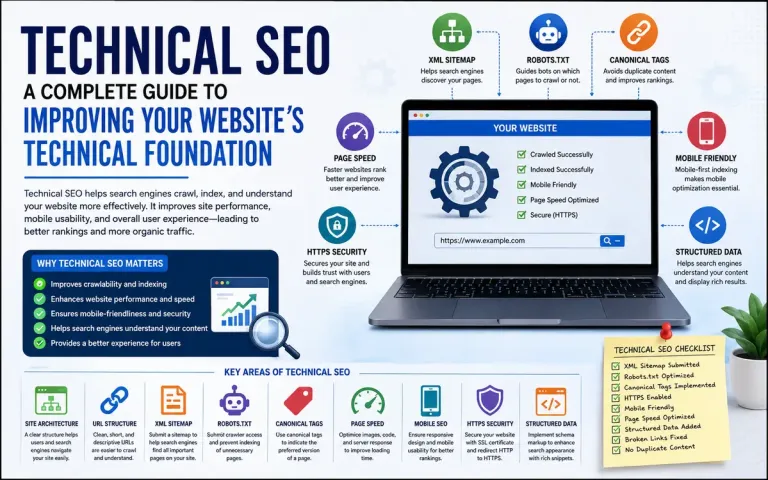
Technical SEO refers to the process of optimizing a website's technical aspects to help search engines crawl, render, index, and understand its pages more effectively. It also focuses on improving website performance, usability, and security for visitors.
The primary objectives of Technical SEO are to:
- Improve website crawlability
- Ensure important pages are indexed
- Enhance website performance
- Optimize mobile usability
- Eliminate technical errors
- Support better user experience
A technically optimized website provides a strong foundation for both search engines and users.
Why Is Technical SEO Important?
Technical SEO helps search engines access your website without unnecessary obstacles. If pages cannot be crawled or indexed correctly, even excellent content may not appear in search results.
A well-implemented Technical SEO strategy offers several benefits:
- Faster page loading speeds
- Better mobile experience
- Improved website security through HTTPS
- Efficient crawling and indexing
- Reduced duplicate content issues
- Enhanced user experience
These improvements contribute to stronger overall SEO performance and a more reliable website.
Key Elements of Technical SEO
Website Architecture
A clear and logical website structure helps both users and search engines navigate your content. Pages should be organized into meaningful categories and connected through internal links. Important pages should be reachable within a few clicks from the homepage, reducing unnecessary complexity.
URL Structure
URLs should be simple, descriptive, and easy to understand.
Good Example:
https://bizinfotech.in/post/technical-seo-guide
Poor Example:
https://bizinfotech.in/page.php?id=245
Short, readable URLs improve usability and clearly indicate the page's topic.
XML Sitemap
An XML sitemap lists the important pages of a website, making it easier for search engines to discover and crawl them. Although search engines can often find pages through internal links, a sitemap acts as a roadmap and is especially useful for larger websites.
Submitting your sitemap through Google Search Console can further assist search engines in discovering updated content.
Robots.txt
The robots.txt file provides instructions to search engine crawlers about which sections of a website they may or should not crawl. It is commonly used to prevent indexing of administrative pages or duplicate content.
However, blocking important pages accidentally can prevent them from appearing in search results, so the file should be configured carefully.
Canonical Tags
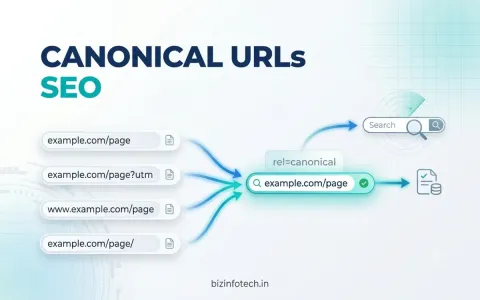
Sometimes similar or identical content exists on multiple URLs. Canonical tags help identify the preferred version of a page, reducing duplicate content issues and consolidating ranking signals.
For example, if both www and non-www versions of a page exist, a canonical tag tells search engines which version should be treated as the primary page.
Mobile Optimization
Google primarily evaluates websites using mobile-first indexing, making mobile usability essential.
A mobile-friendly website should:
- Use responsive design
- Display readable text
- Avoid horizontal scrolling
- Provide touch-friendly navigation
- Load efficiently on smartphones
Since most users now browse on mobile devices, responsive design is no longer optional.
Page Speed and Core Web Vitals
Website speed significantly influences user experience. Slow-loading pages often lead to higher bounce rates and lower user satisfaction.
Google's Core Web Vitals measure key aspects of user experience:
- Largest Contentful Paint (LCP): Loading performance
- Interaction to Next Paint (INP): Responsiveness
- Cumulative Layout Shift (CLS): Visual stability
Improving image optimization, minimizing unnecessary scripts, enabling browser caching, and using modern image formats like WebP can help improve these metrics.
HTTPS and Website Security
HTTPS encrypts communication between users and websites, improving security and protecting sensitive information.
Websites using HTTPS generally inspire greater trust and are considered the standard for modern websites. Ensure your SSL certificate remains valid and avoid mixed-content issues where secure pages load insecure resources.
Structured Data
Structured data, often implemented using Schema Markup, provides additional information about webpage content in a format that search engines can understand.
Depending on the content type, structured data can describe:
- Articles
- Organizations
- FAQs
- Breadcrumbs
- Products
Proper implementation may enhance search result appearance through rich snippets.
Common Technical SEO Mistakes
Several technical issues can negatively affect website performance and search visibility, including:
- Missing XML sitemap
- Incorrect robots.txt configuration
- Duplicate content
- Broken internal links
- Slow page speed
- Missing canonical tags
- Non-responsive design
- Large uncompressed images
- Redirect loops
- Mixed HTTPS content
Regular website audits help identify and resolve these problems before they impact performance.
Essential Technical SEO Tools
Several free and professional tools can help monitor your website's technical health:
- Google Search Console – Monitor indexing, crawl errors, and search performance.
- Google PageSpeed Insights – Analyze page speed and Core Web Vitals.
- Google Lighthouse – Evaluate performance, accessibility, and SEO.
- Screaming Frog SEO Spider – Audit website structure and technical issues.
- Bing Webmaster Tools – Monitor website performance in Bing search results.
Using these tools regularly helps maintain a technically sound website.
Technical SEO Checklist
Before publishing or auditing your website, ensure that:
- ✔ Website uses HTTPS
- ✔ XML sitemap is updated
- ✔ Robots.txt is correctly configured
- ✔ Canonical tags are implemented
- ✔ URLs are clean and descriptive
- ✔ Website is mobile-friendly
- ✔ Images are optimized
- ✔ Page speed is acceptable
- ✔ Broken links are fixed
- ✔ Structured data is implemented where appropriate
Conclusion
Technical SEO forms the foundation of every successful SEO strategy. While quality content attracts users and on-page optimization improves relevance, technical optimization ensures that search engines can efficiently discover, understand, and index your website.
A technically optimized website is faster, more secure, mobile-friendly, and easier to navigate. By focusing on website architecture, crawlability, indexing, page speed, mobile usability, HTTPS, structured data, and regular technical audits, you create an environment where both users and search engines can interact with your content effectively.
Technical SEO is not a one-time task but an ongoing process. As websites grow and search technologies evolve, regular monitoring and maintenance are essential for sustaining long-term organic visibility and delivering a high-quality user experience.
Related Redings:--
The Complete Guide to Digital Marketing
What Is SEO? A Complete Guide to Search Engine Optimization
Keyword Research: A Complete Beginner's Guide
Frequently Asked Questions
1. What is Technical SEO?
Technical SEO is the process of optimizing a website's technical infrastructure to improve crawling, indexing, performance, and user experience.
2. How is Technical SEO different from On-Page SEO?
Technical SEO focuses on the website's infrastructure, while On-Page SEO focuses on content and page-level optimization.
3. Why is an XML Sitemap important?
It helps search engines discover and crawl important pages more efficiently.
4. What is a canonical tag?
A canonical tag identifies the preferred version of a webpage to reduce duplicate content issues.
5. Does page speed affect SEO?
Yes. Faster pages improve user experience and are an important aspect of modern search optimization.