Introduction
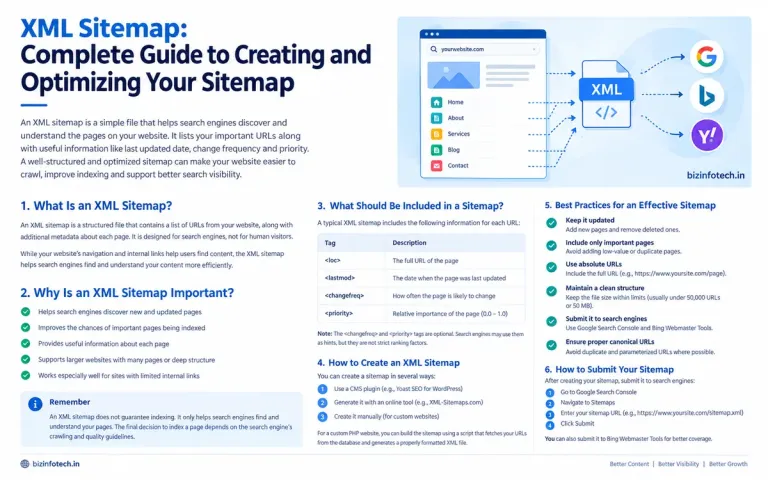
An XML sitemap is one of the simplest technical SEO elements to implement, but it plays an important role in helping search engines discover the important URLs on a website.
As a website grows, search engines need to discover new pages, updated articles, service pages, and other important resources. Although search engines can discover pages through internal links, an XML sitemap provides an additional way to communicate the URLs that you consider important.
For websites with regularly published content, large numbers of pages, complex structures, or limited external links, a well-maintained sitemap can be particularly useful.
Google describes a sitemap as a file that provides information about pages, videos, and other files on a site and helps search engines discover URLs more efficiently. However, submitting a sitemap does not guarantee that every URL will be crawled or indexed.
This complete guide explains what an XML sitemap is, how it works, how to create one, what URLs should be included, how to optimize it, and how to submit it to search engines.
What Is an XML Sitemap?
An XML sitemap is a structured XML file that contains URLs that you want search engines to discover and potentially crawl.
A basic sitemap may look like this:
<?xml version="1.0" encoding="UTF-8"?> <urlset xmlns="http://www.sitemaps.org/schemas/sitemap/0.9"> <url> <loc>https://example.com/</loc> <lastmod>2026-09-18</lastmod> </url> <url> <loc>https://example.com/about</loc> <lastmod>2026-09-10</lastmod> </url> <url> <loc>https://example.com/blog/example-article</loc> <lastmod>2026-09-15</lastmod> </url> </urlset>
The sitemap uses a standardized XML format defined by the Sitemap Protocol.
The most important element is:
<loc>
which identifies the URL.
Other elements, such as <lastmod>, can provide additional information about the URL.
Google recommends using fully qualified absolute URLs in sitemaps rather than relative URLs.
Why Is an XML Sitemap Important for SEO?
A sitemap does not directly guarantee higher rankings.
Its primary purpose is to help search engines discover and understand the URLs you consider important.
1. Helps Search Engines Discover URLs
Search engines can discover pages through:
internal links
external links
navigation
category pages
other known URLs
sitemaps
Google explains that a sitemap can help search engines discover URLs, particularly on larger or more complex websites.
2. Helps With New Content Discovery
If you regularly publish articles, adding their URLs to your sitemap gives search engines another way to discover them.
3. Helps With Updated Content
The <lastmod> element can communicate when a page was genuinely last modified.
This is particularly useful when a website frequently updates existing content.
4. Helps Search Engines Understand Your Preferred URLs
Google recommends including the canonical URLs that you want considered for search results rather than URLs that duplicate the same content.
5. Useful for Larger Websites
As the number of pages increases, maintaining a sitemap can make URL discovery more manageable.
Do You Really Need an XML Sitemap?
Not every website absolutely requires a sitemap.
Google says that if a site is small, well linked internally, and its important pages can easily be discovered, a sitemap may not be necessary. Google describes "small" in this context as roughly 500 pages or fewer that need to appear in search results.
However, a sitemap can still be useful.
You should strongly consider using one if:
your website has many pages
you regularly publish new content
your website is relatively new
your website has few external links
some pages are difficult to discover through internal links
you have video, image, or news content
your website has a complex structure
you frequently update important pages
For a growing content website, maintaining a sitemap is generally a sensible technical SEO practice.
XML Sitemap vs HTML Sitemap
These two are often confused.
XML Sitemap
An XML sitemap is primarily designed for search engines.
Example:
sitemap.xml
It contains structured information about URLs.
HTML Sitemap
An HTML sitemap is a normal web page containing links to important pages.
It is primarily designed for website visitors, although it can also help search engines discover linked pages.
For example:
Website Sitemap Home About Services Blog SEO AI Marketing Contact
An XML sitemap and an HTML sitemap serve different purposes.
You can use either or both depending on the structure and needs of your website.
How Does an XML Sitemap Work?
The basic process is:
Website pages
↓
XML Sitemap
↓
Search Engine discovers sitemap
↓
Search Engine fetches URLs
↓
Pages may be crawled
↓
Pages may be indexed if they meet search engine requirements
The important point is that a sitemap is a discovery signal, not an indexing guarantee.
Google explicitly states that URLs included in a sitemap are not guaranteed to be crawled or indexed.
Important XML Sitemap Tags
A basic XML sitemap uses several elements.
<urlset>
This is the root element of a standard XML sitemap.
Example:
<urlset xmlns="http://www.sitemaps.org/schemas/sitemap/0.9">
It contains the URL entries.
<url>
This element represents an individual URL.
Example:
<url> ... </url>
<loc>
This contains the complete URL.
Example:
<loc>https://example.com/about</loc>
The URL should be absolute rather than relative.
<lastmod>
This indicates the date or time when the page was actually last modified.
Example:
<lastmod>2026-09-18</lastmod>
The important point is actual modification.
Do not update <lastmod> simply because you regenerated the sitemap.
The Sitemap Protocol specifies that <lastmod> should represent when the linked page was last modified, not when the sitemap itself was generated.
<changefreq>
Historically, the Sitemap Protocol included <changefreq> to indicate how frequently a page might change.
Example:
<changefreq>weekly</changefreq>
However, you should not rely on this tag as a ranking or crawling control.
Bing's current guidance says optional <changefreq> and <priority> values are ignored by Bing, while accurate <lastmod> values can help it assess freshness.
For modern implementations, accurate <lastmod> data is generally more useful than trying to guess a change frequency.
<priority>
The Sitemap Protocol defines <priority> as a relative value between 0.0 and 1.0.
Example:
<priority>0.8</priority>
However, it should not be treated as a ranking score.
The Sitemap Protocol explains that priority is relative to other URLs on the same site and does not determine ranking positions in search results.
For a simple modern sitemap, you can generally avoid relying on this tag.
Which URLs Should Be Included in an XML Sitemap?
A good sitemap should contain URLs that you actually want search engines to discover and potentially show in search results.
For example:
important pages
published blog articles
service pages
category pages
useful resource pages
canonical product pages
other indexable pages
Google recommends including the URLs that you want to appear in its search results and using the canonical version of a page where multiple URLs represent the same content.
Which URLs Should NOT Be Included?
Avoid adding URLs that you do not want indexed.
For example:
1. Redirecting URLs
If:
/page-old
redirects to:
/page-new
the sitemap should generally contain:
/page-new
rather than the old redirecting URL.
2. Non-Canonical Duplicate URLs
If multiple URLs contain essentially the same content, use the preferred canonical URL in the sitemap.
3. Noindex Pages
If you intentionally do not want a page indexed, it generally does not belong in your search-focused sitemap.
4. Login Pages
Private account or administrative pages should not normally be included.
5. Search Result Pages
Internal search URLs generally do not belong in a standard sitemap.
6. Temporary URLs
Temporary or irrelevant URLs should be excluded.
7. Broken URLs
Never use the sitemap as a list of URLs that return errors.
Sitemap Best Practice: Keep It Clean
Think of your sitemap as a list of your preferred, useful, indexable URLs.
A clean sitemap might contain:
Homepage About Services SEO AI Marketing Important articles Resources Contact
It should not become a dumping ground for every URL generated by your website.
Google specifically recommends avoiding URLs in sitemaps that you do not want to appear in Search.
XML Sitemap Size Limits
Sitemaps have technical size limits.
According to Google, an individual sitemap can contain up to:
50,000 URLs
or
50 MB uncompressed
If your sitemap exceeds either limit, it should be split into multiple sitemap files.
For example:
sitemap-posts.xml sitemap-pages.xml sitemap-services.xml
You can then create a sitemap index.
What Is a Sitemap Index?
A sitemap index is an XML file that points to multiple sitemap files.
Example:
<?xml version="1.0" encoding="UTF-8"?> <sitemapindex xmlns="http://www.sitemaps.org/schemas/sitemap/0.9"> <sitemap> <loc>https://example.com/sitemap-pages.xml</loc> <lastmod>2026-09-18</lastmod> </sitemap> <sitemap> <loc>https://example.com/sitemap-posts.xml</loc> <lastmod>2026-09-18</lastmod> </sitemap> </sitemapindex>
Google supports sitemap index files for managing larger sitemap structures. Each sitemap referenced in the index must meet the applicable sitemap requirements, and a sitemap index can reference up to 50,000 sitemap files.
For a small website, however, a single sitemap is usually simpler.
How to Create an XML Sitemap
There are several ways to create one.
Method 1: CMS-Generated Sitemap
Many content management systems automatically generate sitemaps.
If you use a CMS, check whether it already provides a sitemap before installing another sitemap tool.
Google notes that many popular CMS platforms automatically generate sitemaps.
Method 2: Online Sitemap Generator
You can use sitemap generation software or online tools.
These can be useful for smaller static websites.
However, manually generated sitemaps have a major limitation:
They can become outdated.
If you publish new articles regularly, you would need to regenerate the sitemap.
Method 3: Generate the Sitemap Automatically With PHP
This method is particularly useful for a custom PHP/MySQL website.
Instead of manually entering every article URL, your PHP application can retrieve published posts from your database and generate the XML automatically.
For example, suppose your database contains:
posts ----------------------- id title slug category created_at updated_at
Your PHP script could retrieve published articles and generate:
<url> <loc>https://bizinfotech.in/post/example-article</loc> <lastmod>2026-09-18</lastmod> </url>
for every appropriate article.
This means that when you publish a new article, the sitemap can automatically include it.
For a custom database-driven website, this is often a better long-term approach than manually maintaining a static XML file.
Example PHP Sitemap Structure
A simplified PHP implementation could look like this:
<?php header('Content-Type: application/xml; charset=utf-8'); echo '<?xml version="1.0" encoding="UTF-8"?>'; ?> <urlset xmlns="http://www.sitemaps.org/schemas/sitemap/0.9"> <?php // Example: // $posts = mysqli_query($conn, // "SELECT slug, updated_at FROM posts WHERE status='published'"); while ($post = mysqli_fetch_assoc($posts)) { $url = 'https://bizinfotech.in/post/' . $post['slug']; $lastmod = date('Y-m-d', strtotime($post['updated_at'])); ?> <url> <loc><?= htmlspecialchars($url, ENT_XML1, 'UTF-8') ?></loc> <lastmod><?= $lastmod ?></lastmod> </url> <?php } ?> </urlset>
The exact implementation should be adapted to your database structure and publication logic.
The important concept is:
Database → PHP → XML sitemap
rather than:
Database → manually maintained sitemap
Dynamic Sitemap vs Static Sitemap
Static Sitemap
A static sitemap is an actual XML file:
sitemap.xml
It contains URLs that were manually or programmatically written into the file.
Advantages
simple
easy to inspect
fast to serve
suitable for small sites
Disadvantages
must be updated
easy to forget new pages
outdated URLs can remain
Dynamic Sitemap
A dynamic sitemap is generated from your website's database or application.
Advantages
automatically includes new content
can remove deleted content
can use actual modification dates
ideal for database-driven websites
Disadvantages
requires development
needs testing
database/server errors can affect the sitemap
For a custom PHP/MySQL publishing website, dynamic generation is often a practical long-term solution.
How to Optimize an XML Sitemap
Creating a sitemap is only the first step.
The next step is keeping it accurate.
1. Use Absolute URLs
Use:
https://bizinfotech.in/post/example
rather than:
/post/example
Google specifically recommends fully qualified absolute URLs.
2. Use the Correct HTTPS Version
If your website uses HTTPS, use HTTPS URLs consistently.
Avoid mixing:
http://example.com
and:
https://example.com
when the HTTPS version is your preferred canonical version.
3. Use the Preferred Domain Version
If your canonical website is:
https://bizinfotech.in
then the sitemap should consistently use that version rather than an old www version if the latter redirects to the preferred domain.
This is particularly important after a domain or URL structure change.
4. Include Canonical URLs
If a page is available through multiple URLs, include the preferred canonical URL.
Google specifically recommends choosing canonical URLs and including those URLs in the sitemap.
5. Keep <lastmod> Accurate
If an article was actually updated on:
2026-09-18
then:
<lastmod>2026-09-18</lastmod>
is appropriate.
Do not change every <lastmod> value every time the sitemap is regenerated.
Accurate modification dates are more useful than artificial freshness signals. The Sitemap Protocol and Bing both emphasize that the value should reflect the actual modification date.
6. Remove Deleted Pages
If an article is permanently deleted, do not leave its URL in the sitemap.
The sitemap should represent the current state of your website.
7. Remove Redirecting URLs
If an old URL redirects to a new URL, update the sitemap to contain the final URL.
8. Keep the Sitemap Updated
Whenever you:
publish an article
delete an article
change a URL
update important content
add a new service page
your sitemap should eventually reflect the change.
XML Sitemap and Internal Linking
A sitemap should not replace internal links.
This is a very important SEO principle.
Suppose your website has an article:
Keyword Mapping: How to Assign the Right Keywords to the Right Pages
That article should be accessible through normal HTML links from relevant pages.
For example:
SEO Category ↓ Keyword Research ↓ Search Intent ↓ Keyword Mapping ↓ Keyword Cannibalization
The sitemap provides an additional discovery mechanism.
Internal links provide:
navigation
context
topical relationships
user pathways
Google explains that properly linked sites can often be crawled without a sitemap, while sitemaps provide another way to communicate important URLs.
XML Sitemap and Robots.txt
You can also reference your sitemap from robots.txt.
For example:
User-agent: * Disallow: Sitemap: https://bizinfotech.in/sitemap.xml
The sitemap directive tells crawlers where the sitemap is located.
The Sitemap Protocol supports declaring the sitemap location through robots.txt.
For a website, this is a useful additional discovery method.
How to Submit an XML Sitemap to Google
Once your sitemap is available, you can submit it through Google Search Console.
The general process is:
Step 1
Open your Google Search Console property.
Step 2
Go to the Sitemaps section.
Step 3
Enter the sitemap path.
For example:
sitemap.xml
Step 4
Submit the sitemap.
Google can then fetch and process the sitemap.
For large numbers of URLs, Google recommends submitting a sitemap as a way to help with URL discovery.
How to Check Sitemap Status in Google Search Console
After submission, Search Console can help you monitor the sitemap.
You may see information such as:
sitemap status
discovered URLs
errors
warnings
processing information
If there is an error, investigate the actual URLs and XML structure rather than repeatedly resubmitting the same broken sitemap.
How to Submit a Sitemap to Bing
Bing Webmaster Tools also supports sitemap submission.
You can submit an XML sitemap through Bing Webmaster Tools or reference it through robots.txt.
Bing also recommends keeping sitemap information accurate and supports XML sitemap files and sitemap index files.
XML Sitemap Errors to Watch For
A sitemap can exist but still be poorly implemented.
Common problems include:
1. HTTP URLs Instead of HTTPS
If HTTPS is your preferred version, update the sitemap.
2. 404 URLs
Remove pages that no longer exist.
3. Redirecting URLs
Replace old URLs with their final destinations.
4. Incorrect Canonical URLs
Make sure sitemap URLs correspond to your preferred canonical versions.
5. Relative URLs
Use full absolute URLs.
6. Invalid XML
An XML syntax error can prevent proper processing.
7. Incorrect <lastmod>
Do not use the sitemap generation date for every URL.
8. Noindex URLs
Avoid including URLs that you intentionally don't want indexed.
9. Blocked URLs
Check whether important sitemap URLs are blocked by robots.txt or other crawling restrictions.
10. Duplicate URLs
Avoid listing the same URL multiple times unnecessarily.
How to Validate an XML Sitemap
Before submitting your sitemap, check it carefully.
Check 1: Open the Sitemap in Your Browser
For example:
https://bizinfotech.in/sitemap.xml
The file should load successfully.
Check 2: Check the HTTP Status
The sitemap should normally return a successful HTTP response.
Check 3: Validate XML Syntax
Make sure all XML tags are properly opened and closed.
Check 4: Check URLs
Open several URLs from the sitemap and verify that they work.
Check 5: Check Canonicalization
Confirm that the sitemap URLs match the preferred canonical URLs.
Check 6: Check Search Console
After submission, monitor the sitemap report for errors.
XML Sitemap for Blog Websites
Blogs benefit particularly from automated sitemap management.
Imagine your blog currently has:
20 articles
Manually maintaining a sitemap is possible.
But after publishing:
50 articles 100 articles 500 articles
manual maintenance becomes increasingly inconvenient.
A database-driven blog should ideally generate the sitemap from published content.
For example:
SELECT slug, updated_at FROM posts WHERE status = 'published' ORDER BY updated_at DESC;
The PHP application can then convert each database record into a <url> entry.
This approach reduces the possibility of forgetting newly published content.
XML Sitemap for a Custom PHP Website
For a custom PHP website such as BizInfoTech, you can structure the sitemap around different types of content.
For example:
sitemap.xml
could contain:
homepage
main pages
service pages
blog articles
resource pages
For a larger website, you could separate them:
sitemap-pages.xml sitemap-posts.xml sitemap-services.xml sitemap-resources.xml
and then use:
sitemap-index.xml
This structure can make maintenance and troubleshooting easier as the site grows.
Should Every Blog Article Be in the Sitemap?
If an article is:
published
useful
indexable
canonical
intended for search visibility
then it would generally be appropriate to include it in your sitemap.
However, simply putting a page in a sitemap does not guarantee indexing.
Google evaluates many factors when deciding whether to crawl and index a URL.
Therefore, sitemap management should be combined with:
quality content
internal linking
crawlable URLs
proper canonicalization
good technical SEO
useful page experience
Should Category Pages Be Included?
It depends on the role of your category pages.
If a category page provides useful navigation and contains meaningful content or links to a valuable collection of articles, including it may make sense.
For example:
/seo /ai /marketing
could be useful indexable category pages.
However, thin category pages that provide little value do not automatically need to be included.
The same principle applies:
Include pages that you actually want search engines to discover and potentially show in search.
Should Images Be Included in an XML Sitemap?
Google supports image sitemap extensions.
An image sitemap can provide additional information about images, particularly when images may be difficult for crawlers to discover through normal HTML.
For many ordinary blog websites, however, properly implemented images within crawlable HTML may be sufficient.
If your website has a large image library or images loaded through JavaScript, an image sitemap can be worth considering.
XML Sitemap and SEO Rankings
A common misconception is:
"If I submit a sitemap, my rankings will increase."
That is not how a sitemap works.
A sitemap primarily helps with URL discovery and crawling.
It does not guarantee:
indexing
ranking
traffic
higher positions
immediate crawling
Google explicitly describes sitemaps as a way to help discover URLs and states that sitemap inclusion does not guarantee crawling or indexing.
Therefore, think of a sitemap as part of your technical SEO foundation, not as a ranking shortcut.
XML Sitemap Best Practices Checklist
Before publishing your sitemap, check the following:
URLs
Use absolute URLs.
Use HTTPS where appropriate.
Use the preferred canonical URLs.
Remove broken URLs.
Remove redirecting URLs.
Avoid duplicate URLs.
Content
Include important indexable pages.
Include new articles.
Remove permanently deleted pages.
Keep important updated pages current.
XML
Use valid XML syntax.
Use UTF-8 encoding.
Use the correct sitemap namespace.
Keep within the 50,000 URL / 50 MB limits.
Use a sitemap index when necessary.
<lastmod>
Use the actual modification date.
Do not change it just because the sitemap was regenerated.
Keep it accurate.
Technical SEO
Make the sitemap accessible.
Reference it in robots.txt.
Submit it to Google Search Console.
Submit it to Bing Webmaster Tools.
Monitor errors.
Common XML Sitemap Mistakes
Mistake 1: Including Every URL
More URLs do not automatically make a sitemap better.
Include the URLs that matter.
Mistake 2: Treating Sitemap Submission as an Indexing Guarantee
A sitemap is a discovery signal, not an indexing guarantee.
Mistake 3: Using Fake Last-Modified Dates
Do not mark every page as updated simply because the sitemap was regenerated.
Mistake 4: Including Redirecting URLs
Use the final destination instead.
Mistake 5: Including Noindex Pages
Keep the sitemap focused on pages intended for search visibility.
Mistake 6: Forgetting to Update the Sitemap
A static sitemap can quickly become outdated on a frequently updated website.
Mistake 7: Using the Sitemap Instead of Internal Links
Search engines should still be able to discover important pages through normal crawlable links.
Mistake 8: Creating Multiple Sitemaps Without a Reason
For a small website, one clean sitemap is usually easier to manage.
Frequently Asked Questions
What is an XML sitemap?
An XML sitemap is a structured file containing URLs that you want search engines to discover and potentially crawl.
Does an XML sitemap improve rankings?
A sitemap does not directly guarantee higher rankings. Its main purpose is to help search engines discover important URLs.
Is an XML sitemap necessary for every website?
No. Small, well-linked websites may not strictly need one, but a sitemap can still be useful, especially as a site grows.
How many URLs can an XML sitemap contain?
A single sitemap can contain up to 50,000 URLs or 50 MB uncompressed. Larger sites should split their URLs across multiple sitemap files.
What should I put in <lastmod>?
Use the actual date or datetime when the page was last modified, not the date when the sitemap was generated.
Should I include redirected URLs?
Generally, no. Use the final canonical destination instead.
Should noindex pages be included?
A search-focused sitemap should generally contain URLs that you want search engines to consider for search results, not pages that you intentionally exclude.
Can I create an XML sitemap manually?
Yes. Manual creation can work for small websites, but automatically generating the sitemap is more practical as the number of URLs grows.
Can a PHP website generate an XML sitemap?
Yes. A custom PHP website can query its database and dynamically generate a sitemap containing published pages and articles.
Where should I submit my sitemap?
You can submit it through Google Search Console and Bing Webmaster Tools. You can also reference its location in your site's robots.txt file.
Does submitting a sitemap guarantee indexing?
No. A sitemap helps search engines discover URLs, but inclusion in the sitemap does not guarantee crawling or indexing.
Final Thoughts
An XML sitemap is a small technical component that can play an important role in a well-organized website.
Its purpose is straightforward:
Tell search engines which URLs you consider important and make those URLs easier to discover.
The best sitemap is not necessarily the largest one.
It is the one that is:
accurate
clean
current
technically valid
focused on useful indexable URLs
consistent with your canonical URL structure
For a database-driven website, automatic sitemap generation is particularly useful because the sitemap can stay synchronized with published content.
As your website grows, your sitemap can grow with it—without requiring you to manually add every new article.
Most importantly, remember that a sitemap is only one part of technical SEO.
A strong SEO foundation combines:
Crawlable URLs + Internal Links + Quality Content + Canonicalization + Accurate Sitemap + Search Console Monitoring
When these elements work together, search engines have a clearer path to discovering and understanding your website.
Your sitemap helps search engines find your important pages. Your content gives them a reason to keep them.
Related articles:-
Robots.txt: Complete Guide to Controlling Search Engine Crawling
Meta Descriptions: Best Practices for SEO and Higher Click-Through Rates