Introduction
Keyword research helps you discover what people search for. But finding keywords is only the beginning.
The next challenge is deciding which keyword should target which page on your website.
This process is called keyword mapping.
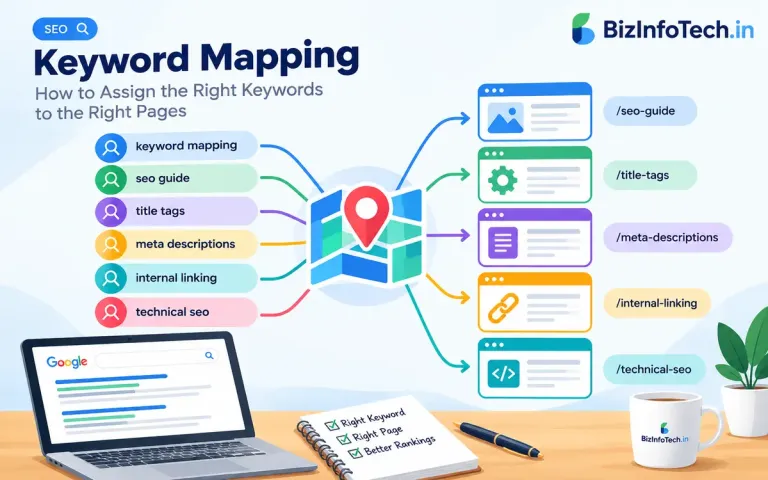
Keyword mapping involves assigning relevant keywords and search intents to specific pages so that each important page has a clear search purpose. Instead of trying to make every page rank for the same group of keywords, you create a logical relationship between keywords, search intent, content, and URLs.
For example, a website offering SEO services might have separate pages for:
SEO services
Local SEO
Technical SEO
SEO content writing
SEO analytics
Trying to optimize all these pages for the same keyword, such as "SEO services," can create unnecessary competition between your own pages.
A better approach is to map different keyword groups to the pages that best satisfy their specific search intents.
In simple terms:
Keyword research tells you what people search for. Keyword mapping tells you where those searches should be answered on your website.
What Is Keyword Mapping?
Keyword mapping is the process of assigning target keywords and related search terms to specific pages of a website.
A keyword map normally connects:
Keyword → Search Intent → Content Topic → URL
For example:
| Page | Primary Keyword | Related Keywords | Search Intent |
|---|---|---|---|
| SEO Guide | what is SEO | SEO meaning, search engine optimization | Informational |
| SEO Services | SEO services | SEO company, SEO agency | Commercial |
| Local SEO Guide | local SEO | local search optimization, local SEO strategy | Informational |
| SEO Analytics | SEO analytics | SEO measurement, SEO reporting | Informational |
The objective is not to assign as many keywords as possible to every page.
The objective is to create a clear keyword-to-page relationship.
Why Is Keyword Mapping Important for SEO?
A well-organized keyword map can help you build a more logical website structure and prevent several common SEO problems.
1. It Gives Every Page a Clear Search Purpose
Each important page should answer a particular user need.
For example:
"what is technical SEO" → educational article
"technical SEO services" → service page
"technical SEO checklist" → practical guide
Although these searches are related, they may represent different needs.
Mapping them correctly helps you decide whether they belong on the same page or on separate pages.
2. It Reduces Keyword Cannibalization
Keyword cannibalization can occur when multiple pages on your website target the same or very similar search intent.
For example, imagine a website has three articles:
SEO Strategy
SEO Techniques
SEO Methods
If all three are primarily targeting "SEO strategy," they may have overlapping purposes.
Keyword mapping forces you to ask:
Does this keyword need a new page, or should an existing page target it?
3. It Helps You Avoid Creating Unnecessary Pages
Not every keyword deserves its own article.
Suppose you discover these keywords:
SEO title tag
title tag SEO
SEO title tags
title tags for SEO
These searches may represent essentially the same topic.
Creating four separate articles could produce unnecessary duplication.
A better approach may be to create one comprehensive page targeting the main topic and naturally address the variations within that page.
Google's guidance emphasizes creating useful, people-first content rather than producing large numbers of pages primarily to manipulate search rankings.
4. It Improves Internal Linking
Once you know which page is the primary destination for a topic, you can link related articles to it.
For example:
SEO Cluster
What Is SEO?
Keyword Research
Search Intent
SEO Title Tags
Meta Descriptions
Keyword Mapping
Technical SEO
Internal Linking
These pages can support one another through relevant internal links.
5. It Makes Content Planning Easier
A keyword map can become an editorial roadmap.
Instead of randomly choosing topics, you can identify:
existing pages
missing topics
overlapping topics
supporting articles
commercial opportunities
informational opportunities
This makes content development more systematic.
Keyword Mapping vs Keyword Research
Keyword research and keyword mapping are closely related, but they are not the same thing.
Keyword Research
Keyword research answers:
What are people searching for?
You may discover keywords such as:
SEO
SEO strategy
keyword research
SEO tools
technical SEO
local SEO
Keyword Mapping
Keyword mapping answers:
Which page should target each keyword?
For example:
| Keyword | Target Page |
|---|---|
| what is SEO | SEO beginner guide |
| keyword research | Keyword Research guide |
| technical SEO | Technical SEO guide |
| local SEO | Local SEO guide |
| SEO services | SEO services page |
Therefore:
Keyword research discovers opportunities.
Keyword mapping organizes those opportunities.
The Relationship Between Keywords and Search Intent
Keyword mapping should not be based on keywords alone.
Search intent is equally important.
A keyword may look relevant to a page but still have the wrong intent.
For example, consider:
"SEO tools"
Someone searching this phrase could want:
a list of SEO tools
comparisons between tools
pricing information
a particular SEO software product
a free SEO tool
Now consider:
This clearly has a primarily informational purpose.
Therefore, before assigning a keyword to a page, ask:
What does the searcher actually want to accomplish?
Your earlier article on search intent is especially useful here because keyword mapping should connect the keyword with the user's underlying purpose, not simply with words appearing in the query.
The Main Types of Search Intent to Consider
Informational Intent
The user wants information.
Examples:
what is SEO
how does SEO work
what is keyword mapping
how to write SEO content
These searches usually map to educational content.
Navigational Intent
The user is looking for a particular website, page, or destination.
Examples:
Google Search Console
Ahrefs login
HubSpot blog
These queries may not require you to create a dedicated article unless the search is relevant to your own brand or website.
Commercial Investigation
The user is researching before making a decision.
Examples:
best SEO tools
SEO software comparison
SEO agency vs freelancer
best keyword research tools
These searches can map to comparison articles, reviews, buying guides, or service-related content.
Transactional Intent
The user is ready to take an action.
Examples:
buy SEO software
hire SEO consultant
SEO services
SEO audit service
These searches may be better suited to product, service, or conversion-focused pages.
How to Create a Keyword Map Step by Step
Step 1: Collect Your Existing URLs
Start by creating a list of important pages on your website.
Include:
homepage
service pages
category pages
product pages
blog articles
resource pages
landing pages
For a blog, you can export your article URLs from your database, sitemap, CMS, or spreadsheet.
The goal is to understand what pages already exist before creating new ones.
Step 2: Collect Your Keyword List
Next, gather keywords from sources such as:
Google Search Console
keyword research tools
Google search suggestions
related searches
competitor research
customer questions
existing website queries
your own content research
Do not immediately create a page for every keyword.
First, organize the keywords into logical groups.
Step 3: Group Similar Keywords
Keyword grouping involves identifying terms that represent the same or closely related topic.
For example:
keyword research
keyword research SEO
SEO keyword research
keyword research guide
how to do keyword research
These may belong to one broader topic.
Another group might be:
SEO title tags
title tag SEO
SEO page title
title tags for SEO
Again, these terms are closely related.
The important question is whether the search results and search intent indicate that they can be satisfactorily addressed by the same page.
Step 4: Identify the Primary Keyword
After grouping keywords, select a primary keyword for the page.
The primary keyword should represent the central topic of the page.
For example:
Primary keyword: keyword mapping
Related terms:
keyword mapping SEO
SEO keyword mapping
keyword mapping strategy
keyword-to-page mapping
how to map keywords
The primary keyword does not need to be repeated unnaturally throughout the page.
It simply provides a clear way to define the page's main topic.
Step 5: Assign Search Intent
For every keyword group, identify the dominant search intent.
For example:
| Keyword Group | Intent |
|---|---|
| what is keyword mapping | Informational |
| keyword mapping guide | Informational |
| keyword mapping template | Informational / Practical |
| keyword mapping tool | Commercial |
| SEO services | Transactional / Commercial |
This step helps prevent you from assigning a keyword to a page that does not actually satisfy the searcher's needs.
Step 6: Match the Keyword Group to an Existing Page
Before creating a new URL, check whether an existing page already satisfies the keyword group.
For example, suppose you already have:
/seo/keyword-research
and you discover the keyword:
"how to find keywords for SEO."
If the existing article already explains the process thoroughly, you may not need another page.
Instead, improve the existing article and incorporate the relevant concept naturally.
This prevents unnecessary content duplication.
Step 7: Create a New Page Only When Necessary
A new page may make sense when:
the topic has a distinct search intent
the existing page cannot adequately satisfy the query
the topic deserves substantial independent coverage
the audience or conversion purpose is different
the content belongs to a different stage of the user journey
For example:
"What is SEO?"
and
"SEO Services"
have fundamentally different purposes.
A beginner guide and a service page should normally remain separate.
Step 8: Optimize the Page Around the Mapped Topic
Once the keyword is assigned, use it naturally in appropriate places.
Depending on the page, this may include:
page title
H1
introductory content
relevant H2/H3 headings
body text
image alt text where genuinely descriptive
URL where appropriate
internal links
meta description
However, optimization does not mean inserting the keyword everywhere.
Google's spam guidance specifically identifies unnatural repetition of keywords as keyword stuffing.
The content should remain useful and natural for readers.
Step 9: Connect Related Pages With Internal Links
Keyword mapping becomes much more powerful when combined with internal linking.
Imagine your SEO cluster contains:
SEO
↓
Keyword Research
↓
Search Intent
↓
Keyword Mapping
↓
Keyword Cannibalization
↓
Internal Linking
Each article can link to relevant supporting pages.
For example, your Keyword Mapping article can link to:
Keyword Research
Search Intent
Internal Linking
Keyword Cannibalization
This creates a connected topic structure rather than a collection of isolated articles.
Google notes that breadcrumb structures can help users understand and explore a site's hierarchy.
A Practical Keyword Mapping Example
Imagine a website that provides SEO information and services.
You discover these keywords:
| Keyword | Intent | Suggested Page |
|---|---|---|
| what is SEO | Informational | SEO Guide |
| keyword research | Informational | Keyword Research Guide |
| search intent SEO | Informational | Search Intent Guide |
| SEO title tags | Informational | SEO Title Tags Guide |
| meta descriptions | Informational | Meta Description Guide |
| keyword mapping | Informational | Keyword Mapping Guide |
| keyword cannibalization | Informational | Keyword Cannibalization Guide |
| SEO services | Commercial/Transactional | SEO Services |
| local SEO services | Commercial/Transactional | Local SEO Services |
| SEO audit service | Transactional | SEO Audit Service |
Notice that related keywords are distributed across different pages according to their purposes.
This is the core idea behind keyword mapping.
Keyword Mapping and Keyword Cannibalization
Keyword mapping is particularly useful for identifying potential keyword cannibalization.
Suppose your website contains:
/seo-guide
/seo-strategy
/seo-techniques
and all three pages are primarily targeting:
"SEO strategy."
You should investigate whether these pages have sufficiently different purposes.
Possible solutions include:
Consolidating Similar Content
If two pages provide substantially similar information, you may combine them into a stronger resource.
Repositioning a Page
A page could be rewritten around a more specific topic.
Changing Internal Links
Links can reinforce which page is intended to be the main resource for a particular topic.
Using Canonicalization When Appropriate
Canonicalization can help indicate the preferred URL among duplicate or substantially similar versions, although it is not simply a tool for resolving every keyword overlap problem. Google describes canonicalization as selecting the representative URL among duplicate or similar pages.
The first solution should generally be understanding the content and intent of the pages rather than adding technical tags automatically.
Keyword Mapping for Content Clusters
Keyword mapping works especially well with topic clusters.
A topic cluster typically contains:
Pillar Page
↓
Supporting Articles
↓
Specific Subtopics
For example:
SEO Pillar
What Is SEO? A Complete Guide
Supporting articles:
Keyword Research
Search Intent
SEO Title Tags
Meta Descriptions
Image SEO
Internal Linking
Technical SEO
Local SEO
SEO Analytics
Backlinks
Keyword Mapping
Keyword Cannibalization
Each page has its own primary topic while remaining connected to the broader SEO subject.
This structure can help users navigate related information and gives you a clearer framework for future content.
Keyword Mapping for Service Websites
Keyword mapping is not only for blogs.
It is especially important for service websites.
Suppose a web development company offers:
Website Development
E-commerce Development
Website Redesign
SEO Services
Landing Page Development
Instead of optimizing every page for:
"web development services,"
you could create a more specific mapping structure.
| Page | Primary Keyword |
|---|---|
| Main service page | web development services |
| E-commerce page | e-commerce website development |
| Redesign page | website redesign services |
| SEO page | SEO services |
| Landing page | landing page development |
This gives each service page a distinct purpose.
Keyword Mapping for Local SEO
Local businesses should also consider geographic intent.
For example:
Primary service: Web development
Potential searches:
web development services
web developer near me
website development services in Chapra
web development company in Bihar
However, creating dozens of nearly identical city pages simply to capture geographic keywords can create poor-quality or doorway-style content.
Google specifically warns against creating substantially similar pages targeting specific regions or cities when those pages mainly funnel users toward the same destination.
A local page should therefore provide genuine value for the location it targets.
How to Handle Long-Tail Keywords
Long-tail keywords often contain more specific wording.
Examples:
how to improve website SEO
how to write SEO title tags
how to optimize images for SEO
keyword mapping for small websites
Do not automatically create a separate page for every long-tail keyword.
Instead, ask:
Can the existing page answer this query completely?
If yes, include the topic naturally in the existing page.
Does the query represent a different intent?
If yes, consider a separate page.
Is there enough useful information for a standalone resource?
If yes, a new page may be justified.
This approach keeps your website focused rather than unnecessarily large.
Common Keyword Mapping Mistakes
1. Assigning Too Many Keywords to One Page
A page targeting dozens of unrelated keywords can lose topical focus.
2. Creating One Page for Every Keyword
Keyword variations do not automatically require separate URLs.
3. Ignoring Search Intent
A keyword may be relevant but still inappropriate for the page.
4. Mapping the Same Primary Keyword to Multiple Pages
This can create unnecessary competition between your own pages.
5. Ignoring Existing Content
Always check whether you already have a page that can satisfy the topic.
6. Changing URLs Too Frequently
URLs should be planned carefully. Constantly changing URLs can create redirects, broken links, indexing complications, and unnecessary maintenance.
7. Keyword Stuffing
Repeating a mapped keyword excessively does not make the page more relevant. Google's guidance explicitly identifies unnatural keyword repetition as keyword stuffing.
8. Creating Pages Only for Search Engines
The purpose of keyword mapping is to organize useful content, not to manufacture pages simply because a keyword exists.
Keyword Mapping and AI Search
Search is increasingly presenting users with AI-generated summaries and other search features.
This makes the underlying quality and usefulness of your content increasingly important.
Keyword mapping should therefore not become a process of mechanically inserting exact-match phrases into pages.
Instead, map:
Keyword → Intent → Topic → Useful Answer → Supporting Evidence → Appropriate Page
Google's current Search documentation continues to emphasize how content can appear across evolving search experiences, including AI-related search features.
A strong keyword map can help you build clear topical coverage while allowing each page to provide a focused answer.
How to Build a Keyword Mapping Spreadsheet
A simple spreadsheet can make the process much easier.
Recommended columns include:
| Column | Purpose |
|---|---|
| URL | Existing or planned page |
| Page Title | Current/planned title |
| Primary Keyword | Main target topic |
| Secondary Keywords | Closely related terms |
| Search Intent | Informational, commercial, etc. |
| Content Type | Guide, service, comparison, etc. |
| Search Volume | Optional research metric |
| Current Position | Current ranking |
| Impressions | Search Console data |
| Clicks | Search Console data |
| CTR | Search performance |
| Status | Existing / Planned / Update |
| Internal Links | Related pages |
| Notes | Content decisions |
The spreadsheet does not need to become complicated.
The most important columns are:
URL + Primary Keyword + Search Intent + Related Keywords + Status.
A Simple Keyword Mapping Workflow
You can use this workflow whenever you plan new SEO content:
1. Collect keywords
↓
2. Group similar keywords
↓
3. Identify search intent
↓
4. Check existing pages
↓
5. Choose the best existing page or create a new one
↓
6. Assign one primary topic
↓
7. Add closely related keywords
↓
8. Optimize the page naturally
↓
9. Add relevant internal links
↓
10. Monitor performance and update the map
This process turns keyword research into an organized content strategy.
How to Maintain Your Keyword Map
Keyword mapping is not a one-time task.
Search behavior changes. Your website grows. New articles are published. Some pages become outdated.
Review your keyword map periodically.
Look for:
keywords with increasing impressions
pages receiving unexpected queries
pages competing for similar terms
keywords with no suitable page
outdated pages
opportunities to combine similar articles
missing supporting content
new commercial opportunities
Google Search Console can be particularly useful because it shows the queries for which your existing pages receive impressions and clicks.
This allows your keyword map to evolve based on actual search data rather than assumptions.
Keyword Mapping Checklist
Before publishing a new SEO page, ask:
Keyword
Have I identified the primary keyword?
Have I grouped closely related keywords?
Is the keyword genuinely relevant to the page?
Search Intent
What does the searcher actually want?
Does this page satisfy that intent?
Is the content format appropriate?
Existing Content
Do I already have a page covering this topic?
Could I improve an existing page instead?
Am I unnecessarily creating a competing page?
On-Page SEO
Is the primary topic reflected naturally in the title?
Is the H1 clear?
Are relevant subtopics covered?
Is the URL descriptive?
Is the meta description useful?
Internal Linking
Does this page link to relevant existing content?
Can related articles link back to this page?
Is the page part of a logical topic cluster?
Quality
Does the page provide substantial value?
Is it written for users rather than search engines?
Does it avoid unnecessary keyword repetition?
Does it add something useful beyond simply targeting a keyword?
Final Thoughts
Keyword mapping is the bridge between keyword research and website architecture.
Without mapping, a website can gradually accumulate articles that target similar topics, compete with one another, or leave important search intents uncovered.
With a structured keyword map, you can create a clearer relationship between:
Search Query → Search Intent → Keyword Group → Page → Internal Links → Content Cluster
The goal is not to make every page rank for hundreds of keywords.
The goal is to make sure that the right page is available to satisfy the right search intent.
A strong keyword strategy therefore asks two questions:
What are people searching for?
and
Which page should provide the best answer?
When those two questions are connected through thoughtful keyword mapping, your SEO strategy becomes more organized, scalable, and easier to maintain.
Frequently Asked Questions
What is keyword mapping in SEO?
Keyword mapping is the process of assigning target keywords and related search terms to specific website pages based on their topic and search intent.
Why is keyword mapping important?
It helps organize website content, reduce unnecessary keyword overlap, identify content gaps, improve internal linking, and create a more logical content structure.
Should every keyword have a separate page?
No. Closely related keywords with the same search intent can often be addressed effectively on one comprehensive page.
What is the difference between keyword research and keyword mapping?
Keyword research identifies what users search for. Keyword mapping determines which pages should target those searches.
Can keyword mapping prevent keyword cannibalization?
It can help identify and prevent unnecessary overlap by assigning different search intents and topics to appropriate pages.
How many keywords should one page target?
There is no fixed number. Focus on one primary topic and naturally cover closely related terms that help satisfy the same search intent.
Should I create a new page for every long-tail keyword?
No. First determine whether an existing page can adequately answer the query. Create a separate page when the topic or search intent genuinely warrants independent coverage.
Can keyword mapping improve internal linking?
Yes. Once you know which page is the main resource for a topic, related pages can link to it using contextually relevant internal links.
Is keyword mapping useful for local SEO?
Yes. It can help separate service, location, and informational intents. However, location-specific pages should provide genuine local value rather than being created solely to target geographic keyword variations.
Key Takeaway
Keyword research finds the opportunities. Keyword mapping decides where those opportunities belong.
A successful keyword map does not simply assign keywords to URLs. It connects keywords, search intent, content quality, website structure, and user needs.
That is what turns a collection of SEO keywords into a coherent content strategy.
Related articles:-
Keyword Research: A Complete Beginner's Guide to Finding the Right Keywords for SEO
On-Page SEO: A Complete Guide to Optimizing Your Web Pages
SEO Content Writing: How to Create Content That Ranks and Engages Readers
What Is SEO? A Complete Guide to Search Engine Optimization
How Do Search Engines Work? Crawling, Indexing, and Ranking Explained