Introduction
Businesses today generate enormous amounts of data and perform thousands of repetitive tasks every day. Employees process emails, enter data, prepare reports, approve documents, respond to customer inquiries, update databases, schedule meetings, and coordinate activities across multiple software systems.
Traditionally, many of these activities have depended on manual intervention. AI-powered business automation is changing this model by combining artificial intelligence with workflow automation, APIs, robotic process automation (RPA), machine learning, and AI agents.
Unlike traditional automation, which generally follows predefined rules, AI-powered automation can interpret information, classify documents, generate content, make recommendations, and increasingly execute multi-step tasks. IBM describes AI workflows as structured sequences in which AI systems can perform, coordinate, or enhance processes either autonomously or alongside human workers.
The result is a shift from simply automating individual tasks to redesigning entire business workflows.
What Is AI-Powered Business Automation?
AI-powered business automation is the use of artificial intelligence technologies to automate, optimize, coordinate, and improve business processes with minimal human intervention.
It combines conventional workflow automation with AI capabilities such as:
Machine learning
Generative AI
Natural language processing
Computer vision
Predictive analytics
AI agents
Robotic process automation
Intelligent document processing
APIs and system integration
For example, a traditional automation system might automatically send an acknowledgment email whenever a customer submits a form.
An AI-powered system can go much further:
Customer inquiry → AI reads the message → identifies intent → checks customer history → determines priority → generates a response → updates CRM → creates a support ticket → escalates complex cases to an employee.
This illustrates the fundamental difference between task automation and intelligent workflow automation.
Traditional Automation vs. AI-Powered Automation
| Feature | Traditional Automation | AI-Powered Automation |
|---|---|---|
| Logic | Rule-based | Rules + AI |
| Input | Usually structured | Structured + unstructured |
| Decision-making | Predefined rules | AI-assisted or AI-driven |
| Text understanding | Limited | Strong |
| Document processing | Template-based | Intelligent extraction |
| Adaptability | Relatively low | Higher |
| Content generation | Usually unavailable | Available through generative AI |
| Complex workflows | Requires extensive rules | Can use AI agents and orchestration |
| Human involvement | Often required | Can be reduced but remains important |
| Example | Send invoice automatically | Read invoice, validate it, update ERP, detect anomalies, route for approval |
Traditional automation remains useful. AI does not replace it; rather, AI expands what automation systems can handle.
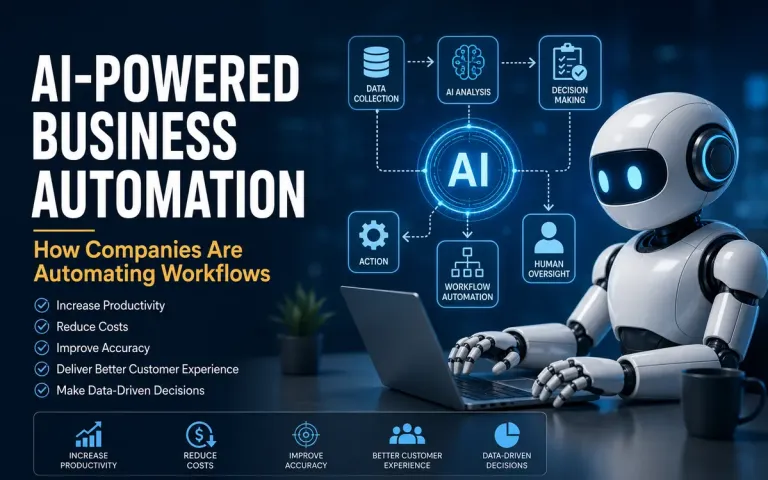
How AI-Powered Business Automation Works
An AI-powered workflow typically contains several interconnected stages.
1. Trigger
The workflow starts because of an event.
Examples include:
A customer submits a form
An email arrives
An invoice is uploaded
A payment is received
A sales lead is created
A scheduled time is reached
A KPI crosses a threshold
2. Data Collection
The system gathers relevant information from business applications.
This might include:
CRM data
ERP records
Emails
Documents
Customer profiles
Databases
Spreadsheets
Website forms
Cloud applications
3. AI Analysis
The AI system interprets the information.
For example, it may:
Classify an email
Extract information from an invoice
Identify customer sentiment
Predict the likelihood of conversion
Detect anomalies
Summarize a document
Determine the appropriate workflow
4. Decision
Based on predefined rules, AI recommendations, or agentic reasoning, the system determines what should happen next.
5. Action
The automation executes one or more actions.
For example:
Analyze → Approve → Update CRM → Send Email → Notify Employee
6. Human Review
For sensitive or uncertain decisions, the workflow can route the task to a human.
This is known as human-in-the-loop automation.
7. Monitoring
Organizations monitor:
Accuracy
Processing time
Errors
Exceptions
Costs
Productivity
ROI
This allows the workflow to be continuously improved.
Key Technologies Behind AI Business Automation
1. Generative AI
Generative AI allows automated systems to create new content.
Businesses can use it for:
Emails
Reports
Product descriptions
Marketing content
Meeting summaries
Customer responses
Proposals
Documentation
IBM notes that generative AI can support workflow activities such as summarization, content generation, data analysis, and automated email responses.
2. AI Agents
AI agents represent an important development in business automation.
Instead of simply responding to a prompt, an AI agent can pursue a defined objective through multiple steps, using tools and external systems.
For example:
Objective: Follow up with qualified sales leads.
The agent could:
Identify qualified leads.
Review CRM information.
Research relevant customer information.
Draft personalized emails.
Send approved messages.
Record interactions.
Schedule follow-ups.
Escalate high-value opportunities to sales representatives.
AI agents therefore move automation toward goal-oriented workflows rather than simple rule-based sequences. IBM describes agents as active executors capable of handling complex, multi-step workflow tasks.
3. Robotic Process Automation
RPA uses software bots to perform repetitive computer-based tasks.
Examples include:
Copying data between systems
Updating spreadsheets
Downloading reports
Entering invoices
Processing forms
Moving files
Performing repetitive desktop operations
AI can make RPA more intelligent by enabling bots to interpret documents and unstructured information.
4. Natural Language Processing
NLP enables systems to understand human language.
Businesses can use NLP to:
Classify customer emails
Analyze reviews
Detect sentiment
Summarize documents
Extract information
Categorize support tickets
Analyze employee feedback
5. Intelligent Document Processing
Businesses receive enormous volumes of documents, including:
Invoices
Purchase orders
Contracts
Applications
Receipts
Identity documents
Claims
AI-powered document processing can extract relevant information and route it into appropriate business systems.
6. APIs and Integrations
Automation becomes significantly more powerful when systems can communicate with each other.
For example:
Website → CRM → AI model → Email platform → Accounting software
Instead of employees manually transferring information between applications, APIs can move data automatically.
Modern automation platforms increasingly combine cloud workflows, RPA, AI and connectors. Microsoft's Power Automate, for example, supports cloud flows, desktop RPA, process mining, AI processing, AI-generated content and API connectors.
Major Business Areas Using AI Automation
1. Marketing Automation
Marketing departments can automate:
Lead segmentation
Email campaigns
Customer personalization
Content creation
Social media scheduling
Campaign analysis
Lead scoring
Customer journey management
Example
A visitor downloads an eBook.
The system automatically:
Captures lead → analyzes profile → assigns lead score → adds lead to CRM → sends personalized email → schedules follow-up → alerts salesperson if lead becomes highly qualified.
2. Sales Automation
AI can automate many activities across the sales funnel.
Examples include:
Lead qualification
CRM updates
Sales forecasting
Follow-up emails
Meeting scheduling
Proposal generation
Customer research
Opportunity prioritization
Salespeople can therefore spend less time on administrative work and more time interacting with customers.
3. Customer Service Automation
AI-powered customer service is one of the most visible applications.
An AI system can:
Answer frequently asked questions
Classify support tickets
Analyze customer sentiment
Recommend solutions
Generate responses
Escalate complex issues
Summarize conversations
Update customer records
A simple workflow might look like:
Customer message → AI classification → Knowledge retrieval → Response generation → Customer reply → CRM update
Human agents can take over when the issue requires judgment or authorization.
4. Human Resources
HR departments can automate:
Resume screening
Interview scheduling
Employee onboarding
Document collection
Leave workflows
Employee FAQs
Training reminders
HR document processing
For example, after an employee accepts an offer, an automated workflow could create accounts, send onboarding documents, schedule orientation and notify relevant departments.
However, organizations should be particularly careful with AI in hiring because biased training data or poorly designed decision systems can produce discriminatory outcomes.
5. Finance and Accounting
Finance teams can use AI automation for:
Invoice processing
Expense categorization
Payment reconciliation
Fraud detection
Financial reporting
Accounts payable
Accounts receivable
Cash-flow forecasting
For example:
Invoice received → AI extracts information → validates vendor → checks purchase order → detects discrepancies → routes approval → updates accounting system.
6. Supply Chain Management
AI automation can help organizations monitor:
Inventory
Supplier performance
Demand forecasts
Logistics
Purchase orders
Delivery schedules
Predictive AI can identify potential supply disruptions before they become major operational problems.
7. IT Operations
AI-powered automation can assist IT teams with:
Ticket classification
Password reset workflows
System monitoring
Incident detection
Log analysis
Routine troubleshooting
Software deployment
Security alerts
AI agents can increasingly coordinate multiple steps rather than merely generating recommendations.
8. Management Reporting
Management reporting is another strong automation opportunity.
Instead of manually collecting information from multiple systems every week, organizations can build workflows that:
Collect data.
Validate the information.
Calculate KPIs.
Generate charts.
Identify unusual changes.
Summarize findings.
Send reports to managers.
This transforms reporting from a manual activity into a continuous information process.
Benefits of AI-Powered Business Automation
1. Increased Productivity
Automation reduces the amount of time employees spend on repetitive administrative work.
Employees can devote more time to:
Strategy
Innovation
Problem-solving
Customer relationships
Decision-making
IBM identifies reduction of repetitive manual work and errors as important benefits of workflow automation.
2. Lower Operational Costs
Automating repetitive processes can reduce the amount of manual effort required for routine activities.
However, businesses should calculate total cost of ownership, including:
AI model costs
Software licenses
Integration costs
Infrastructure
Maintenance
Training
Governance
Automation is not automatically cheaper simply because it uses AI.
3. Faster Processing
A workflow that previously required hours of manual work can potentially be completed in minutes or seconds.
This can be particularly valuable for:
Customer service
Order processing
Invoice processing
Lead management
Reporting
4. Fewer Human Errors
Manual data entry creates opportunities for mistakes.
Automated workflows can improve consistency by applying the same process repeatedly.
Nevertheless, AI systems can introduce a different category of errors, including incorrect classifications and hallucinated outputs. Therefore, automation should include validation and exception-handling mechanisms.
5. Better Customer Experience
Automation enables organizations to respond more quickly.
For example:
Customer inquiry → AI analyzes request → retrieves relevant information → generates response → updates customer record
Customers receive faster assistance while employees handle more complicated cases.
6. Improved Decision-Making
AI can analyze large quantities of data and identify patterns that might be difficult for humans to detect manually.
Managers can receive:
Forecasts
Recommendations
Alerts
Trend analysis
Risk indicators
The objective should not be to eliminate managerial judgment but to provide better information for decision-making.
Challenges of AI-Powered Business Automation
Despite its advantages, AI automation introduces significant challenges.
1. Data Quality
AI systems depend heavily on data.
Poor-quality data can lead to poor results.
The principle remains:
Garbage in → garbage out.
Businesses should therefore establish data-quality controls before automating critical workflows.
2. Security and Privacy
Automated systems may process sensitive:
Customer information
Employee data
Financial records
Business documents
Intellectual property
Organizations need appropriate:
Access controls
Encryption
Data governance
Authentication
Monitoring
Audit mechanisms
3. AI Hallucinations
Generative AI can produce plausible but incorrect information.
This becomes particularly dangerous when AI is connected to business systems and allowed to perform actions automatically.
For high-impact processes, organizations should implement:
Validation rules
Human review
Reliable knowledge sources
Confidence thresholds
Audit logs
4. Integration Complexity
Businesses rarely operate on a single software platform.
A typical organization may use:
CRM + ERP + HRMS + accounting software + email + cloud storage + analytics + customer-support software
Connecting these systems can be technically complex.
5. Employee Resistance
Employees may fear that automation will eliminate their jobs.
Successful implementation therefore requires:
Communication
Training
Reskilling
Employee participation
Clear role definitions
The goal should be to automate tasks, not blindly automate people out of processes.
6. Governance and Accountability
When an automated system makes a mistake, organizations need to know:
What happened?
Which system made the decision?
What data was used?
Which model was involved?
Who approved the workflow?
Who is responsible for the outcome?
As AI adoption expands, governance becomes increasingly important. Recent enterprise research and commentary highlight the gap between AI adoption and measurable business impact, emphasizing workflow redesign, orchestration and governance.
How Companies Can Implement AI Automation
Organizations should avoid automating everything at once.
A structured approach is more effective.
Step 1: Identify Repetitive Processes
Look for processes that are:
High volume
Repetitive
Time-consuming
Rule-driven
Error-prone
Digitally accessible
Examples:
Invoice processing
Lead qualification
Customer support
Report generation
Step 2: Map the Existing Workflow
Document the current process.
For example:
Lead received → employee checks information → employee updates CRM → employee sends email → employee schedules follow-up
This reveals where automation can be introduced.
Step 3: Determine Where AI Is Actually Necessary
Not every task needs AI.
A simple rule-based automation may be better for:
If payment received → send confirmation email.
AI becomes more useful when the system must interpret:
Language
Images
Documents
Unstructured data
Complex patterns
This distinction can reduce unnecessary costs and complexity.
Step 4: Select the Appropriate Technology
Depending on the workflow, organizations may combine:
RPA
Workflow platforms
Generative AI
AI agents
APIs
Databases
Analytics
Business applications
Modern platforms increasingly provide low-code ways to create such workflows. For example, Microsoft Power Automate supports process discovery, cloud automation, desktop RPA, AI processing, orchestration and governance.
Step 5: Start With a Pilot
Select one process rather than attempting enterprise-wide automation immediately.
For example:
Pilot: Automate customer-support ticket classification.
Measure:
Processing time
Classification accuracy
Cost per ticket
Escalation rate
Employee satisfaction
Step 6: Introduce Human Oversight
A useful model is:
AI handles routine cases → Human handles exceptions.
This approach allows organizations to benefit from automation without giving unrestricted control to AI systems.
Step 7: Measure ROI
Important metrics include:
Operational Metrics
Processing time
Error rate
Automation rate
Throughput
Financial Metrics
Cost savings
Revenue impact
Cost per transaction
ROI
Customer Metrics
Response time
Customer satisfaction
Resolution rate
Employee Metrics
Hours saved
Employee productivity
Employee satisfaction
Example of an AI-Powered Workflow
Consider an e-commerce company receiving customer return requests.
Traditional Process
Customer email → Employee reads email → Checks order → Checks return policy → Approves/rejects → Sends response → Updates system
AI-Powered Process
Customer email
↓
AI identifies return request
↓
Order information retrieved from database
↓
AI checks eligibility against return policy
↓
Simple eligible cases automatically approved
↓
Return label generated
↓
Customer receives personalized instructions
↓
CRM/order system updated
↓
Complex cases sent to employee
The employee now focuses primarily on exceptions rather than processing every request manually.
AI Automation and the Future of Work
The future of business automation is moving beyond isolated software bots.
The emerging model is increasingly based on AI agents + workflow orchestration + business applications + human oversight.
Traditional automation generally follows:
Trigger → Rule → Action
AI-driven automation can increasingly operate as:
Goal → Understand → Plan → Execute → Evaluate → Adapt → Escalate when necessary
This does not mean businesses should allow autonomous AI to control every process. High-impact decisions may still require human authorization.
The strategic objective is to create a human-AI operating model in which machines handle repetitive, data-intensive activities while people concentrate on judgment, creativity, leadership and relationship management.
AI Automation vs. AI Transformation
It is important to distinguish these concepts.
AI Automation
Uses AI to improve an existing workflow.
Example: Automatically classify customer emails.
AI Transformation
Redesigns the entire business process around AI.
Example: Creating an AI-driven customer service system that continuously monitors inquiries, predicts customer needs, recommends solutions, resolves routine problems and routes complex cases to specialized employees.
Therefore, the greatest value may not come from simply adding AI to existing processes.
It may come from redesigning the process itself.
Recent enterprise analysis similarly emphasizes that AI adoption alone does not guarantee business impact; organizations increasingly need workflow redesign and orchestration to translate AI capabilities into measurable outcomes.
Best Practices for AI Business Automation
Businesses should follow several principles.
1. Start With Business Problems
Do not start with:
"Where can we use AI?"
Start with:
"Which business problem is costing us the most time, money or productivity?"
2. Automate Stable Processes First
Processes should be reasonably understood before they are automated.
3. Keep Humans in High-Risk Decisions
Use human approval for areas involving significant financial, legal, employment or customer consequences.
4. Protect Business Data
Implement appropriate security and access controls.
5. Monitor AI Performance
Automation should be continuously evaluated rather than treated as a one-time implementation.
6. Build Exception Handling
A good automated workflow must answer:
"What happens when something goes wrong?"
7. Measure Business Outcomes
The ultimate objective is not the number of AI tools deployed.
It is:
Higher productivity + better customer experience + lower cost + improved decision-making.
Popular Categories of AI Automation Tools
Businesses can choose from several categories of platforms.
| Category | Primary Purpose |
|---|---|
| Workflow Automation | Connect applications and automate processes |
| RPA | Automate repetitive computer tasks |
| AI Platforms | Build AI-powered applications |
| AI Agents | Execute multi-step objectives |
| CRM Automation | Automate sales and customer processes |
| Marketing Automation | Automate campaigns and customer journeys |
| Document AI | Extract and process information from documents |
| Process Mining | Discover inefficient workflows |
| Integration Platforms | Connect different applications |
| Business Intelligence | Analyze automated business data |
Microsoft Power Automate, for example, combines workflow automation, RPA, process mining, AI capabilities and orchestration, while IBM provides AI workflow and business automation capabilities for structured and unstructured processes.
Conclusion
AI-powered business automation is transforming the way organizations design and execute work.
The technology is moving beyond simple rule-based automation toward intelligent workflows capable of understanding information, making recommendations, generating content, coordinating systems and, increasingly, executing multi-step tasks through AI agents.
However, successful automation is not simply a technology project. It is a business process and organizational transformation project.
Companies that achieve sustainable value from AI automation are likely to be those that:
Identify the right processes
Improve data quality
Integrate business systems
Combine AI with conventional automation
Maintain human oversight
Establish strong governance
Measure measurable business outcomes
Continuously redesign workflows
The central lesson is simple:
The goal of AI automation is not to automate everything. The goal is to automate the right work so people can focus on the work that creates the most value.
As AI agents, workflow orchestration and intelligent automation continue to mature, businesses are likely to move from automating individual tasks toward building AI-enabled end-to-end operating processes.
Frequently Asked Questions
What is AI-powered business automation?
AI-powered business automation uses artificial intelligence together with workflow automation technologies to perform, coordinate or optimize business processes with reduced human intervention.
How is AI automation different from traditional automation?
Traditional automation generally follows predefined rules. AI automation can additionally interpret unstructured information, generate content, identify patterns, make recommendations and support more complex multi-step workflows.
What business processes can be automated with AI?
Common examples include customer service, marketing, sales, HR, finance, accounting, document processing, IT support, reporting, procurement and supply-chain operations.
Can small businesses use AI automation?
Yes. Cloud-based and low-code automation platforms have made workflow automation increasingly accessible to small and medium-sized businesses. Organizations can start with relatively simple processes such as lead management, customer support, appointment scheduling, invoicing and reporting.
Will AI automation replace employees?
AI automation is more accurately viewed as a way to automate tasks and augment employees. Some roles may change substantially, but organizations will continue to need people for judgment, creativity, relationship management, leadership and accountability.
What is the biggest risk of AI automation?
There is no single universal risk. Important concerns include incorrect AI outputs, data privacy, cybersecurity, poor-quality data, integration failures, bias, inadequate governance and excessive reliance on automated decisions.
What is the first step toward AI automation?
The best starting point is to identify a repetitive, measurable business process where automation can produce clear value. Map the existing workflow, determine whether AI is actually necessary, implement a small pilot, measure results and then scale.
Suggested Articles
AI in Customer Service: Applications, Benefits and Challenges
AI Bias: Causes, Examples, Risks and How to Reduce It
AI Hallucinations: Why AI Can Generate Incorrect Information and How to Verify It
AI Prompt Injection: How It Works and How to Prevent It
AI Model Training vs AI Inference: What Is the Difference?
What Is SEO? A Complete Guide to Search Engine Optimization
Digital Marketing: Concepts, Strategies and Best Practices